
The problem
This work addresses the observer part of the direct observation process. In our previous work, we designed the journey for early career social workers to create a direct observation record, add context so they understand the situation that is being observed and select the post-qualifying standards (PQS) they were aiming to demonstrate in the observation.
However, a direct observation is a two-way process. Once a social worker has arranged the observation, they need to get their observer to review the context. After the observation takes place, the observer needs to provide feedback on their practice and confirm the PQS they saw the social worker demonstrating.
We aimed to design a system that seamlessly handled this two-way process. The challenge was to create a journey that guided the observer through two distinct stages, preparation and feedback, making it easy for them to understand where they needed to contribute.
Understanding the need
Our previous research revealed that the relationship between a social worker and their observer is complex.
We identified several key insights that drove this design:
Context comes first
Observers need to understand the situation that is being observed before the observation takes place. Although this is the optimum process, sometimes it is not possible due to time constraints and therefore the system must be flexible enough to allow for social workers to add the context at any time, and for the observer to view it at any stage of the process.
Separation of tasks
The observation event happens between the social worker providing context and the observer providing feedback. The system needs to account for this time gap but similarly not impose any restrictions to enable flexibility.
Fragmented tools
Currently, this process often happens via email chains and Word documents, leading to difficulty in knowing which version of the document is the most up to date.
Communication between the social worker and the observer is critical
For the process to run smoothly there must be an easy way for the two parties to communicate. Previous insight from user research told us that social workers often had to follow up with observers to remind them to provide their feedback. The design suggested ways that the process could be automated or made smoother.
The focus of our design thinking was a digital solution that stores the direct observation evidence centrally while allowing the observer to easily navigate between reviewing information and adding their own feedback at the appropriate point.
What we did
Building on the Moodle prototype used in our previous round of testing, we designed a specific user journey for the observer.
For this round of research, we used the GOV.UK prototype kit. This was due to having a greater technical confidence about the solution we could build in Moodle and using the prototype kit ensured we could work without having to overwrite the previous journey we had tested in Moodle. This is a minor limitation of using the system imposed by the environment set-up where effectively the test and build environments share a common code base.
We mapped out and tested 3 core scenarios to cover the full lifecycle of an observation:
- Pre-observation: The observer receives a prompt to review the context added by the social worker.
- Post-observation: The observer receives a prompt to add their feedback.
- Iteration: The observer returns to the system to update feedback they previously provided.
The email triggers
We designed specific email templates to act as the starting point for testing the user journey. Since observers are often time-poor, the email needed to be clear about exactly which task was required e.g. "Review section 1" or "Add your feedback".
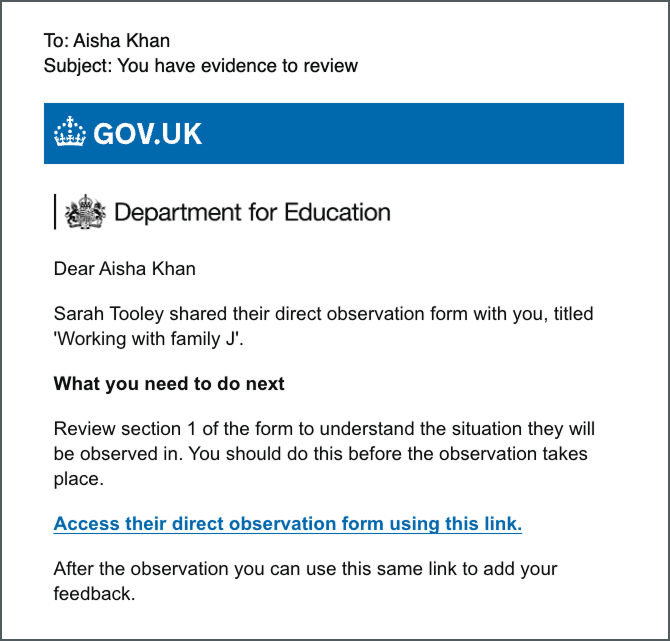
We decided to design two emails:
- A notification that the social worker has shared the form with them, and there is context available for them to view.
- A reminder email sent after the observation has taken place, asking the observer to add their feedback to the direct observation form.
Using a task list component
To manage these different stages, we used a GOV.UK Design System task list component as the starting point for the observer. When the observer selects the link in an email, they are taken to this screen.
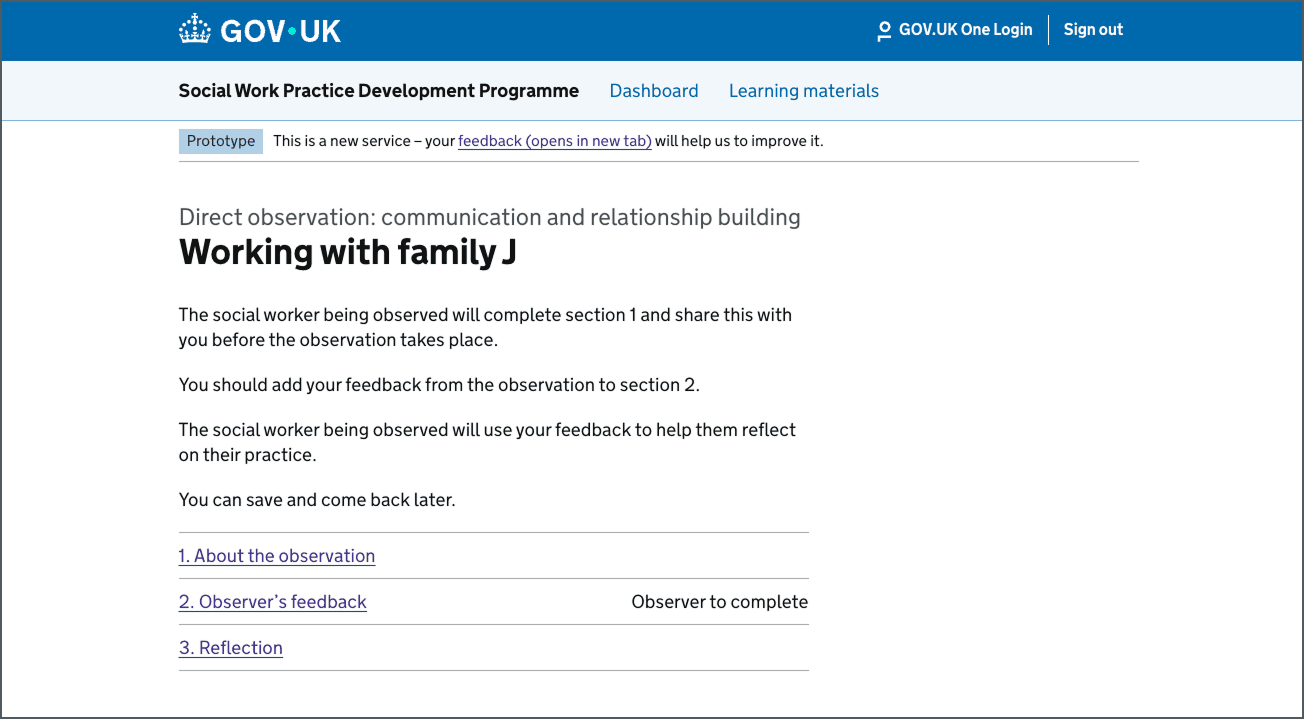
This allowed us to split the direct observation form into three distinct parts:
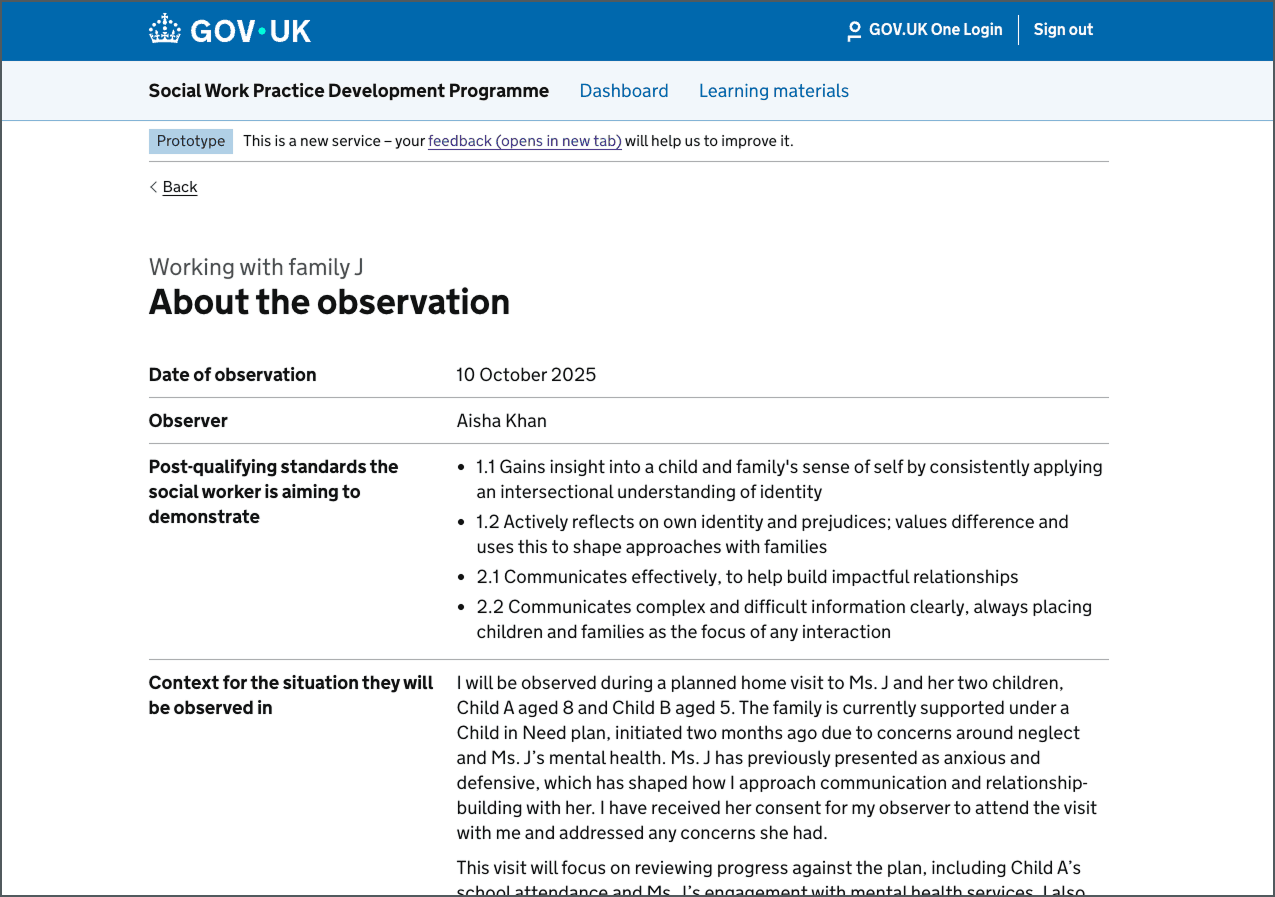
- About the observation: A read-only view where the observer can see information the social worker has entered on the situation being observed
- Observer's feedback: The input form for the observer's evaluation
- Reflection: A section for the social worker to reflect on the feedback given to them by their observer and their practice.
Separating "read" and "write"
We made a specific design decision to keep the social worker's input on the form as a ‘Read Only’ view for the observer. This ensures the observer can clearly distinguish between the information provided by the social worker and the feedback section they need to complete.
Adding feedback
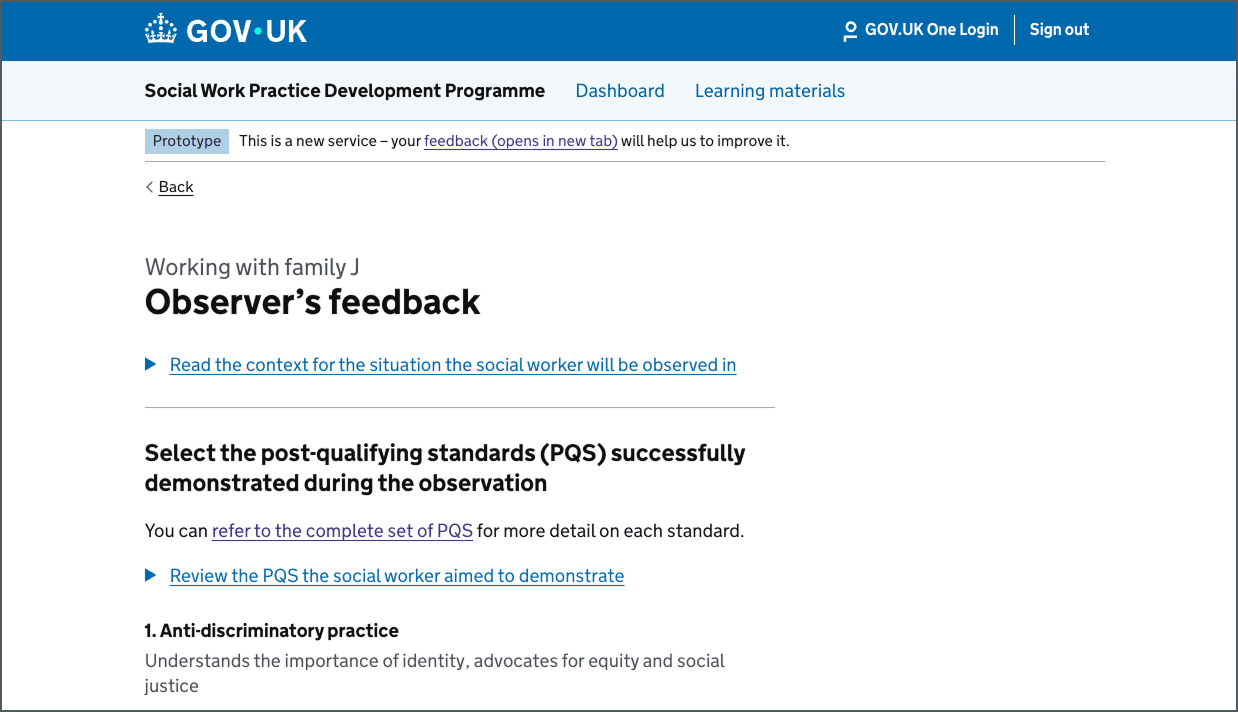
We used the details component to allow the observer to review the context and PQS that the social worker added, so they can refer to these when writing their feedback.
Testing the option to notify the social worker
We looked at two points in the journey to allow the observer to notify the social worker that they had completed their expected actions.
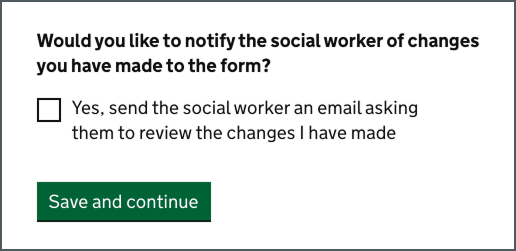
At the bottom of the check your answer page we included an option for the observer to select so that the social worker would be notified once the observer had saved their work.
We also designed an option at the bottom of the task list screen that would give the observer the flexibility to notify the social worker without the need to complete or make any changes to the form. We knew from previous research insights that there was an expectation that both parties would want to notify each other when work was ready to be reviewed.
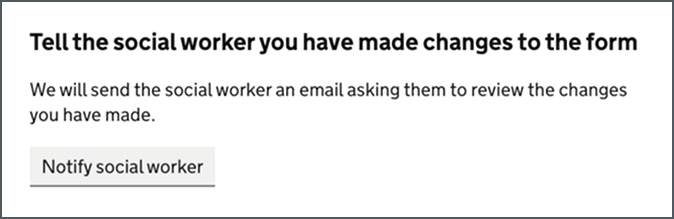
We used a secondary button style for this action to avoid conflict or distraction from the task list component above it.
Closing the journey
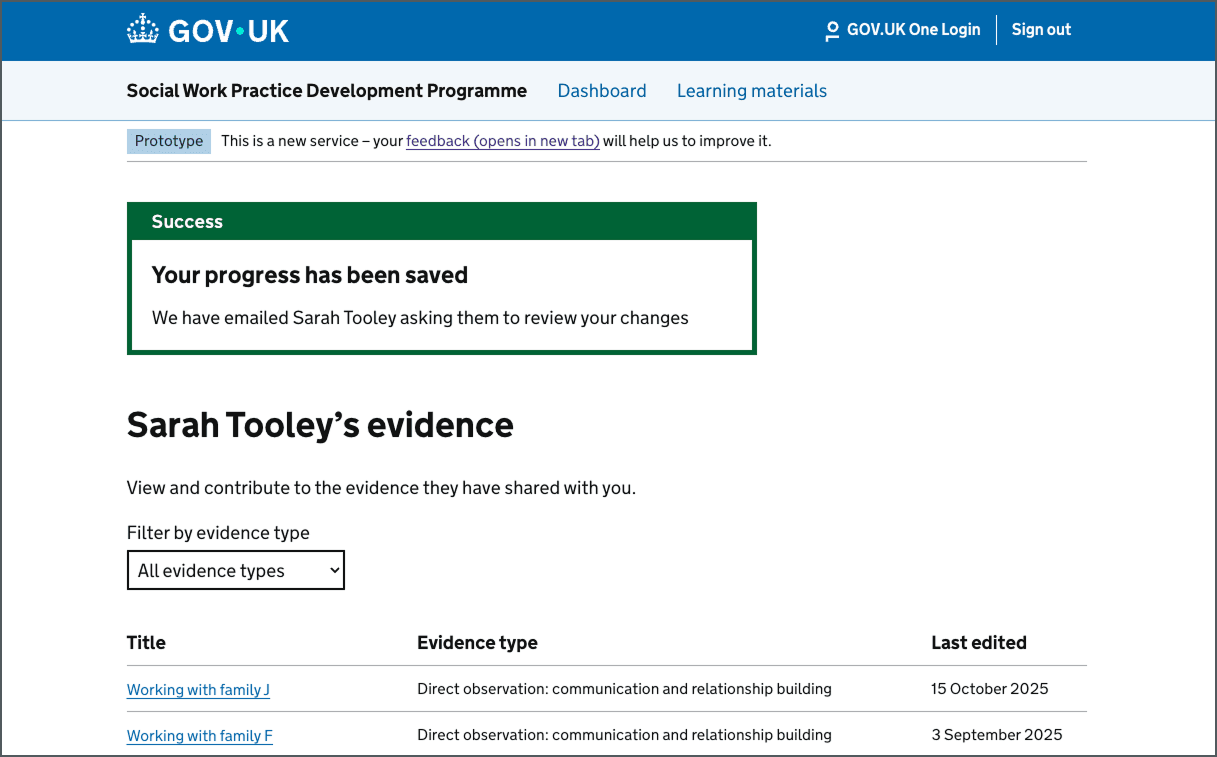
Finally, we designed a central view of all the work the social worker had previously shared with their observer containing a success message that confirms the end of the journey. Once feedback is saved, the observer is shown a confirmation that the data has been shared with the social worker. This confirms to the user that the process of handing back to the social worker is complete.
The outcome
By testing this journey, we established a clear workflow for the multi-user aspect of direct observations.
The hypotheses we took into user research were:
- The task list works as a navigational anchor: It effectively allows users to switch between reviewing information and adding feedback
- Email prompts are essential: Because the process takes place over a period of time, direct email links are beneficial by bringing users back to a specific point in the journey
- Observers will appreciate the options to notify the social worker: By providing suitable options at different points of the journey, we believe users will recognise the benefit of the ways in which they can notify the social worker from within the system
- Clear ownership of data: By explicitly separating the read-only ‘About the observation’ section from the editable ‘Observer’s feedback’ section, we reduced the risk of observers accidentally editing information the social worker added.
We believe this design successfully connects the social worker's input (tested in the previous work: Adapting Moodle to test a new user journey for assessment tools) with the observer's output, creating a full process for gathering evidence as part of a direct observation.
Next steps
Following this round of testing, we want to:
- Analyse the qualitative feedback from the research sessions to refine the content on the full journey and the emails
- Use the feedback to define when the reminder email is sent and work out what triggers we will use in Moodle
- Explore guest access, for when an observer does not have an account on the service
- Explore the third role in this process: the Assessor. We need to determine how an assessor will view this completed package of evidence (the social worker's context and reflection and the observer's feedback)
- Look to iterate the prototype before moving to the build phase in Moodle.