
Context of the research
The Find teacher training courses service launched the candidate account feature in September 2025, enabling candidates to create an account and save courses they are interested in. Since launch, candidates have actively created accounts and begun using this functionality.
Building on this foundation, the design team has developed additional candidate account features to further enhance the candidate experience when using the Find service.
What we tested
These new designs feature we tested included:
Sorting saved courses: candidates can organise their saved course list
Detailed summary card on saved courses page
Link to view and manage applications
Adding notes to saved courses
Recent searches
Email alerts for similar courses
Objectives
To validate the usability of the new navigation to saved courses.
To assess whether candidates would use and value the new design features in the prototype.
To evaluate how easily candidates can compare and narrow down saved courses using the new features.
To better understand how participants currently use the live site to compare courses and narrow down which to apply to.
To better understand what offline processes or documents participants currently use to compare and narrow down courses.
Participants
13 participants (2 international, 11 domestic)
All at different stages of applying to teacher training courses: researching courses, applying for a course, awaiting a decision, or waiting to start a course.
Breakdown of interview structure
- 1 to 1 online usability testing interviews.
In the first part of the session, we explored participants’ experiences with saving courses on Find Teacher Training Courses. We also asked how they currently record or keep track of courses they’re interested in. Many participants used physical notebooks or journals to jot down information about courses. Some participants preferred digital tools, like spreadsheets or Word documents, for more structured comparison or tracking. A few participants did not make formal notes or only relied on memory or the website's features.
Participants took notes to help them manage and compare course information more effectively. They used note‑taking to gather details scattered across different sources, remember complex or easily overlooked information, and keep track of key deadlines and application progress. This process also supported their decision‑making by helping them shortlist and evaluate courses more confidently.
In the second half of the session, participants were shown a prototype of the Find Teacher Training Courses service which contained the new feature designs. We gathered feedback on the designs and observed participants’ behaviour as they used them.
For further information on the introduction of candidate accounts on Find, read our previous design history.
Design iterations made mid-round
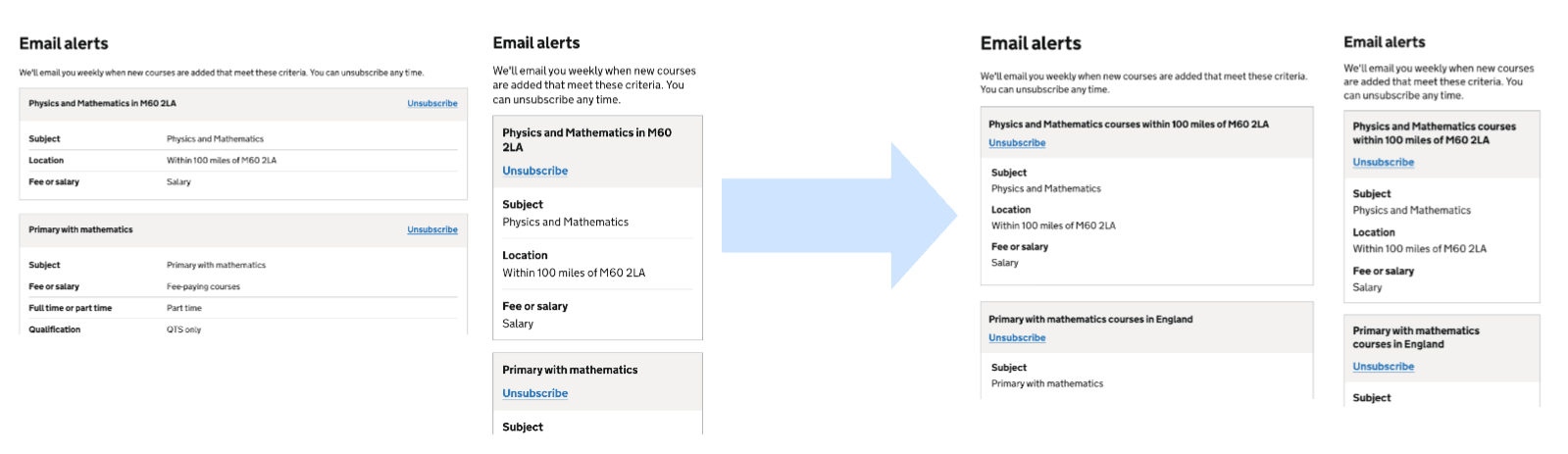
Email alerts:
Challenge: Participants were getting confused between courses, searches and email alerts.
Solutions: Updated the design of the Email alerts page and the Recent searches page.
Information architecture:
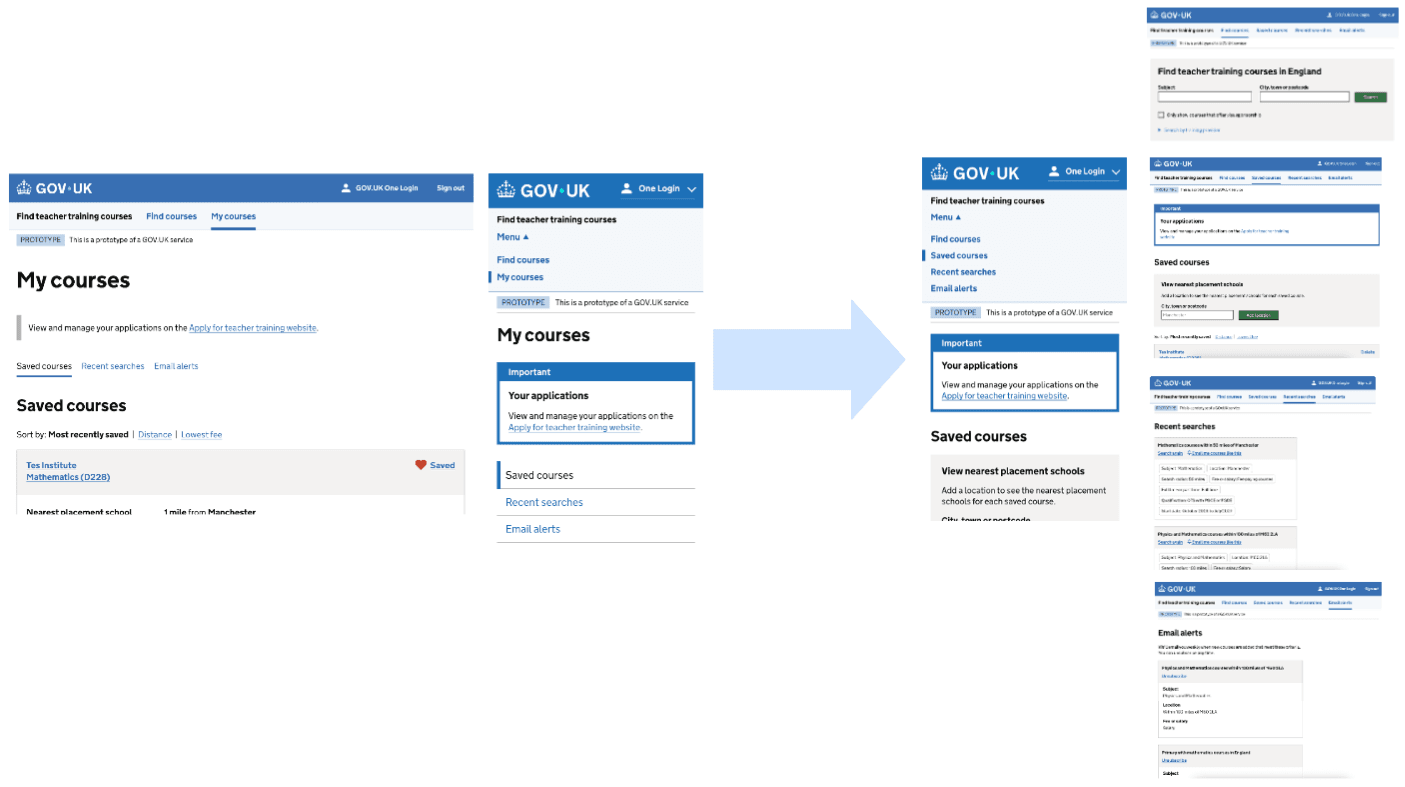
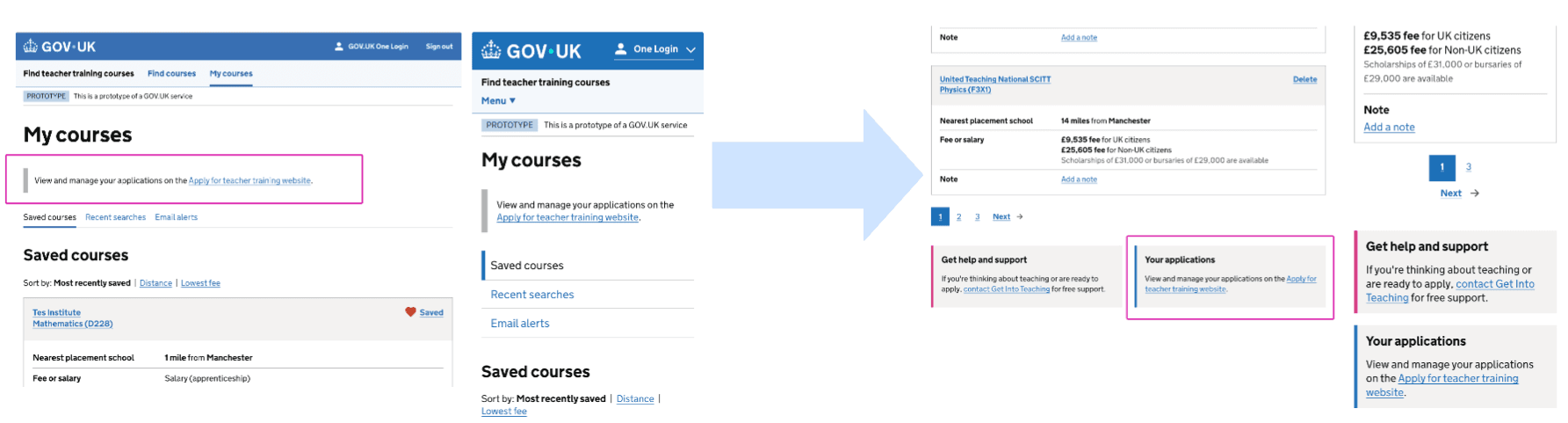
Challenge: Participants were getting confused with the 'My courses' section, thinking this is where they would find their applications.
Solution: Replaced 'My courses' with separate primary navigation items for:
- Saved courses
- Recent searches
- Email alerts
Deleting a saved course:
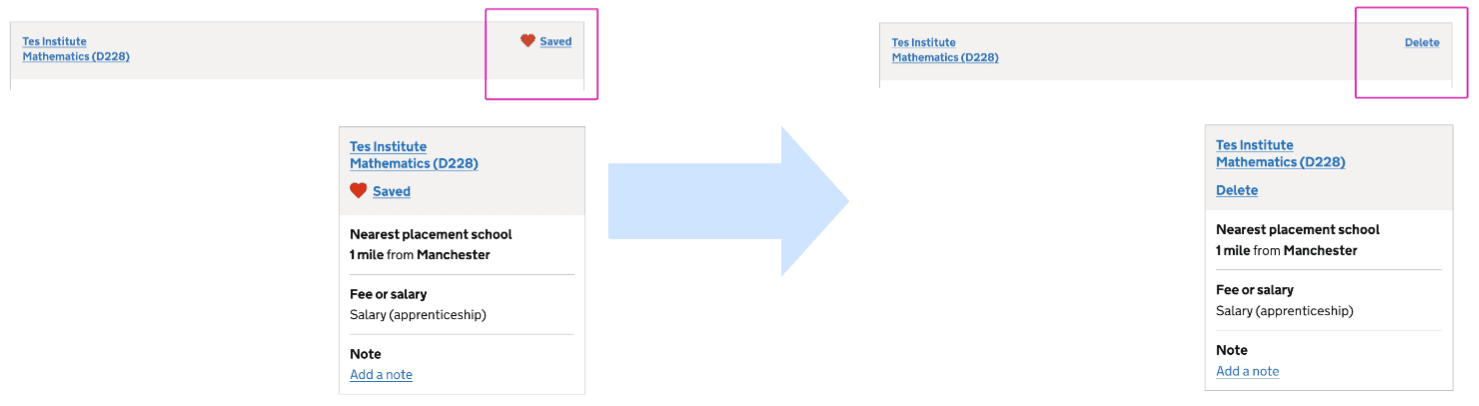
Challenge: Participants lacked confidence in how to remove a saved course.
Solution: Revert the content to 'Delete' (which is on the live site)
Linking the nearest placement school information and location search box:
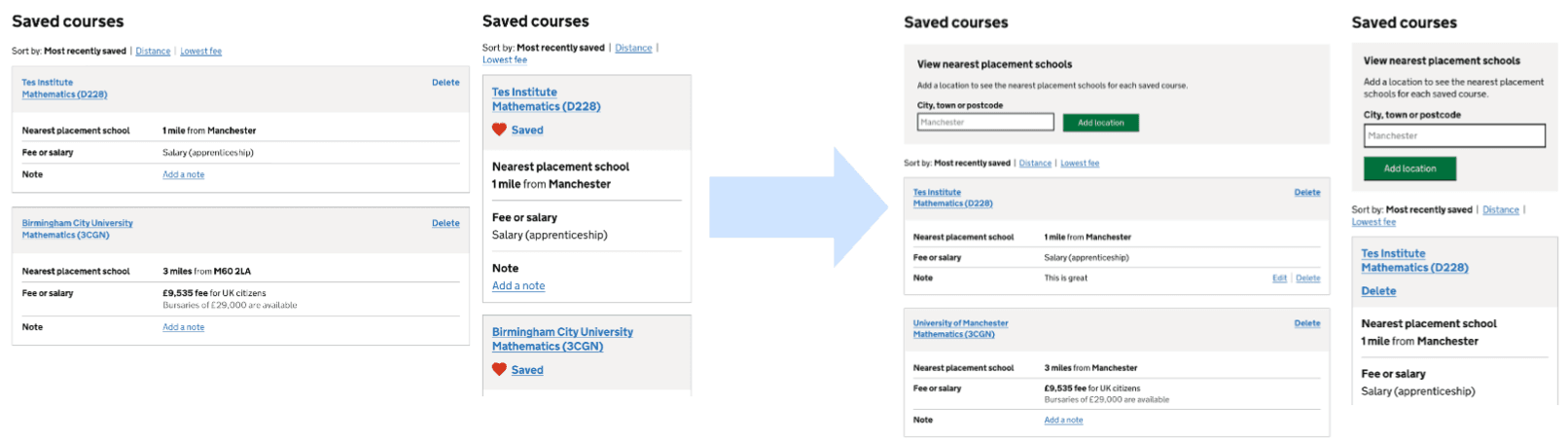
Challenge: People were confused about the different locations for nearest placement schools.
Solutions:
- Removed saving the location when a course is saved.
- Added the ability to enter a location on the saved courses page, to see the nearest placement school for each course.
Link to the Apply service:
Challenge: Participants were not seeing the link to the Apply service
Solutions:
- Changed the component from inset to callout.
- Added “your applications” title.
Recent searches structure change:
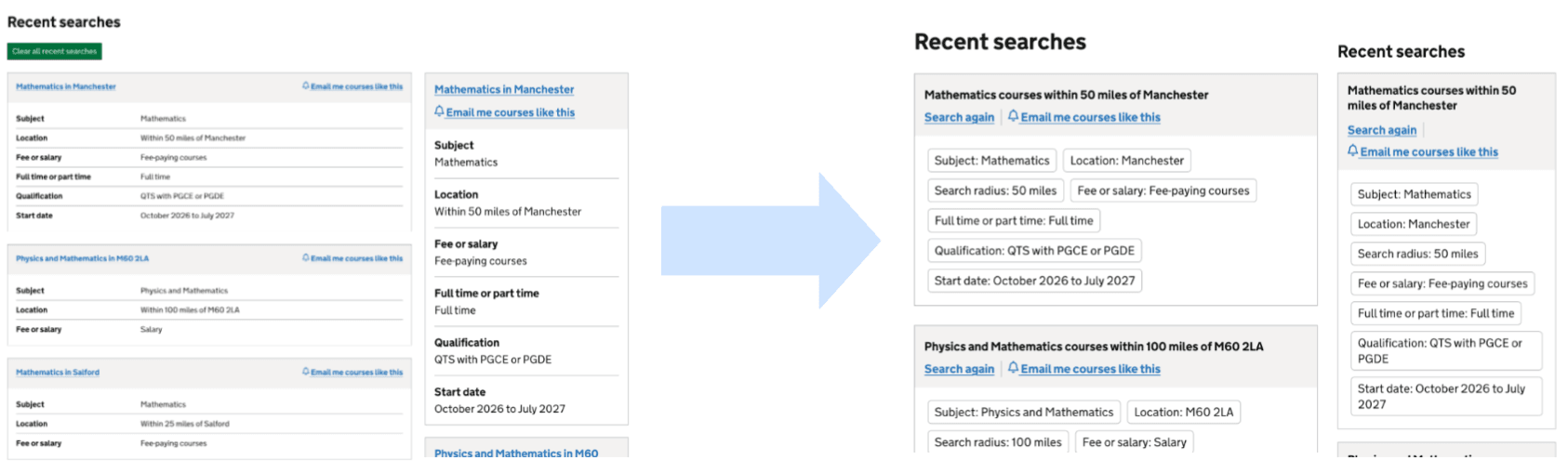
Challenge: Participants misunderstood and thought this was courses.
Solutions:
- Styled to be more like the search results active filters.
- Moved ‘clear all’ button to the bottom.
- Replaced the hyperlink title with a 'Search again' link.
Feedback on features tested:
- Participants find the ‘Saved Courses’ page helpful for key details and being able to make notes but want more course information and a comparison view. It would be helpful to have a feature to allow quick side by side comparison of courses.
- Additionally, participants expressed a need for multiple saved course lists, enabling them to organise courses by different areas or search goals. This would allow users to have separate lists based on course type, location and availability status.
- The location search feature is essential to participants when organising saved courses by distance but is can be overlooked or mistaken for a general search. Participants explained they want it to be more visually distinct and more obvious that this feature is for filtering saved courses, not starting a new search.
- Participants see the ‘sort by’ feature as important but it can be overlooked. They mainly sort by distance and lowest fee and want more filtering options and greater prominence.
- Participants value the ‘not accepting applications’ label on their saved courses, because it prevents wasted time but need further explanation as to why.
- Participants found the email alerts feature easy and useful but were unclear about what they'd receive and found the wording vague. They want clearer expectations on what the content they will receive, and more control over alert settings.
- The Recent Searches tab was viewed as useful as it allows participants to easily track their browsing history on the service. Some participants expected the Recent Searches tab to show previously viewed courses with key details (placement, distance, fees).
- Participants found the nearest placement school information helpful for judging commute and deciding which courses to keep. However, they often questioned how accurate or clear the distances were and found some of the data inconsistent or confusing. Many wanted more detail, such as provider location or a wider range of placement distances, and some suggested clearer styling or a map view.
- Participant strongly valued the adding notes feature because it gave them a simple, built‑in way to record details they would otherwise track in notebooks, spreadsheets, or separate documents. Being able to attach notes directly to each saved course helped them keep important information in one place, reduce the need for external tools, and avoid losing track of comparisons. This would make it easier to remember why they saved a course and compare options more confidently during shortlisting.
Summary of insights:
- A consistent theme across all research sessions was confusion about the relationship between the Find and Apply services. Participants did not clearly understand that Find is intended solely for searching and exploring courses, rather than managing or submitting applications.
- As a result, many expected application‑related functionalities to be available within the Find service. Because of this, participants consistently expected to see a link in the top navigation to view or manage their applications.
- Overall, there was uncertainty about the distinction between the two services, with a strong expectation that Find and Apply would be more closely integrated.
- Overall usability was perceived as improved. Participants described the prototype version of the Find service as easier, more intuitive, and more informative for managing saved courses.
Next steps:
As outlined above, introducing candidate accounts on Find has excerbated confusion between the Find and Apply services. To address this, we need to work closely with the Apply team to explore how we can better align the two services and reduce this friction for users.
We will also implement the key candidate account MVP+ functionality tested in this round, including the notes feature, recent searches, email alerts for similar courses, sorting by fee and distance, and improvements to the saved courses page.