
The design challenges we focused on:
- Search navigation in relation to the product name and user group search fields.
- Tagging of services with the user group taxonomy to improve search and find.
Our objectives for this last round of research included:
to evaluate how effectively users locate services using the existing user group taxonomy
whether the current user group-based search and taxonomy align with users’ descriptions of their user groups
to examine whether filter search results match users’ mental models
evaluate if the information presented on the search results page help users determine service relevance.
Our observations and iterations to improve the service are documented in this design history, as well as our previous post.
We saw people use the product name and user groups search fields interchangeably
Users entered search text into each of the fields, rather than adding product names to the product field and user groups to the relevant field.
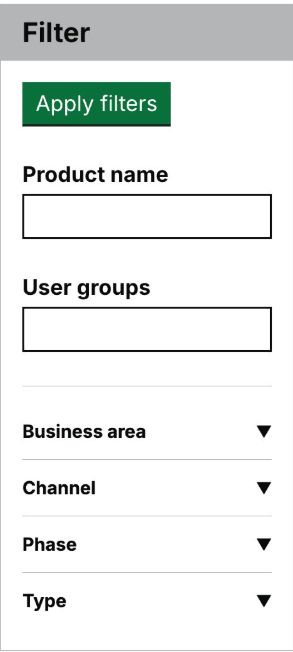
The user groups search box had an auto-complete search function, which restricted users searching ability, when they couldn’t find what they were looking for. Users also often missed the auto-complete options, and pressed enter, not realising they hadn’t selected an option, so their search resulted in nothing.
Examples of user behaviour include using:
- incorrect spellings
- plural terms, for example, teachers
- using a term that is not included within the official user group taxonomy
So we removed the user groups search and created a single general search input
Design changes we made to improve search include:
removing the user group autocomplete
adding and tagging non-preferred terms and synonyms for user groups in the CMS (content management system), to widen search results
adding the service and product title and description in the search results
replacing the ’product name’ search field and the auto-complete ‘users group’ search field with one ‘search’ field
We also added a search term field to Product and Category values content types in the CMS, to allow for a comma separated list of values.
This means, for example, that users can type in multiple search terms to the search field and receive a result of all.
We introduced data tracking for search terms
To learn more about what search terms users enter we’ve added a content model into the CMS to track all search terms, so we can see immediately what people search for, the number of entries it returns and what they are.
We can then look for common searches and misspellings, for example. To help us improve search and make sure we are using the language our users use.
What's next
We'll test the search and filter functionality, to understand if the changes made reflect the users mental models. Can they find what they need, does search and filter work in the way they expect.