
The Find Statistics and data page
The EES find statistics and data page is intended to support users locate the specific statistics publications they are interested in. These statistics publications, or releases, present the latest available data across the education sector, providing reporting on themes from early years funding, through average teacher pay and school performance to apprenticeship uptake and post-education destinations and outcomes. This encompasses the Department's obligations to publish Official statistics required to hold the Department and the Government to account, alongside more ad-hoc publications reporting on new policies or areas of interest.
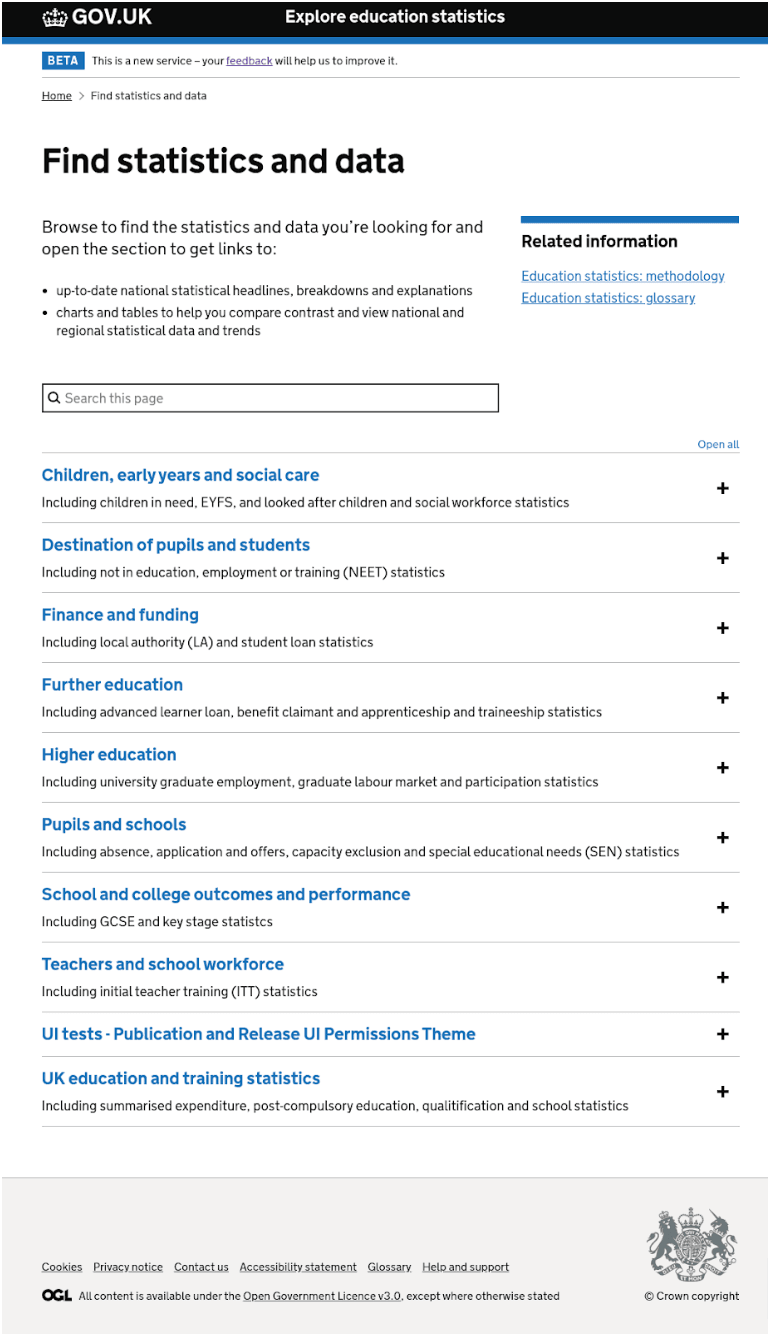
The initial version of the page was released in March 2020 as a minimal viable product (MVP). It consisted of a basic in-page search, listing all top level themes (using GDS accordion sections), then topics (using details component), expanding to show individual publications.
During the public beta phase we have continued to iterate the page design based on user feedback and usability testing, and have recently incorporated a more advanced Azure AI search, and improved user interface to streamline searchability.
The current version
https://explore-education-statistics.service.gov.uk/find-statistics
Why have we made changes to the Find statistics and data page?
The first iteration of the release page was introduced in March 2020 as a minimal viable product (MVP) in public beta. We were aware of certain technical limitations and aimed to improve and continually iterate based on user feedback.
Screenshot showing original page
User needs
Finding relevant information on the site quickly was one of the primary user needs highlighted during our discovery phase, which was summarised as the following user need statement.
As a data analyst, I need an intuitive and efficient way to find data so that I can quickly and accurately retrieve the information I need without getting lost or overwhelmed.
- I want data to be well organised and labelled
- So that I can access the information I need without spending a long time looking for it.
Pain points
User feedback showed we weren't meeting all our users needs with the first version of the ‘Find statistics page’
- many users were struggling to find particular publications based on the taxonomy alone, for example:
“It still requires a prior level of knowledge, I wouldn’t know where to find absence for example by looking at this”
- the page search was very basic and some users found they didn’t always get expected results:
“Searching directly for a term doesn’t always return results”
- not always enough detail or context in search results.
“Find that there are a lot of options, can find myself going down the wrong avenue if not entirely sure what to look for.”
Design iterations
Prototype iteration 1 (April 2022)
We prototyped and tested a design to try and solve the known pain points identified from user feedback on the original version.
Screenshot showing prototype iteration 1
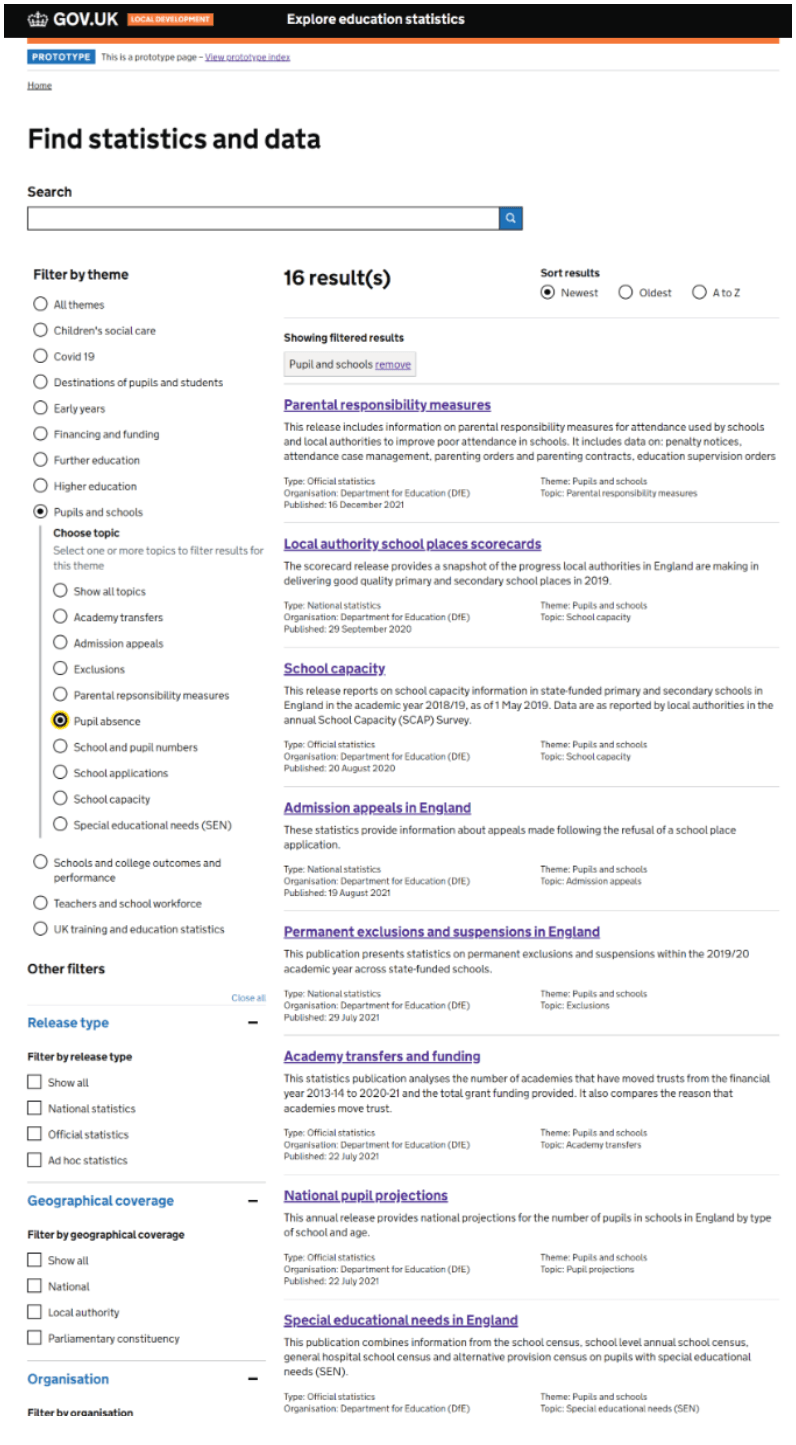
This iteration took it's design cue from the main research and statistics search on gov.uk, providing something visually more consistent with a conventional search pattern. This design includes free text search and filters to allow users to narrow down results to specific themes, or to narrow down further to specific topics within themes.
At that point in time we were still restricted with a relatively basic search engine, but wanted to test whether the inclusion of a more advanced filtering option alongside the search would also still users to get to relevant information more quickly.
Usability testing findings
We tested this prototype with a range of users including external professional analysts from a range of Local authorities, data managers from schools and academies, non-professional users and internal users from the DfE statistics production teams.
Screenshot collating feedback from usability testing
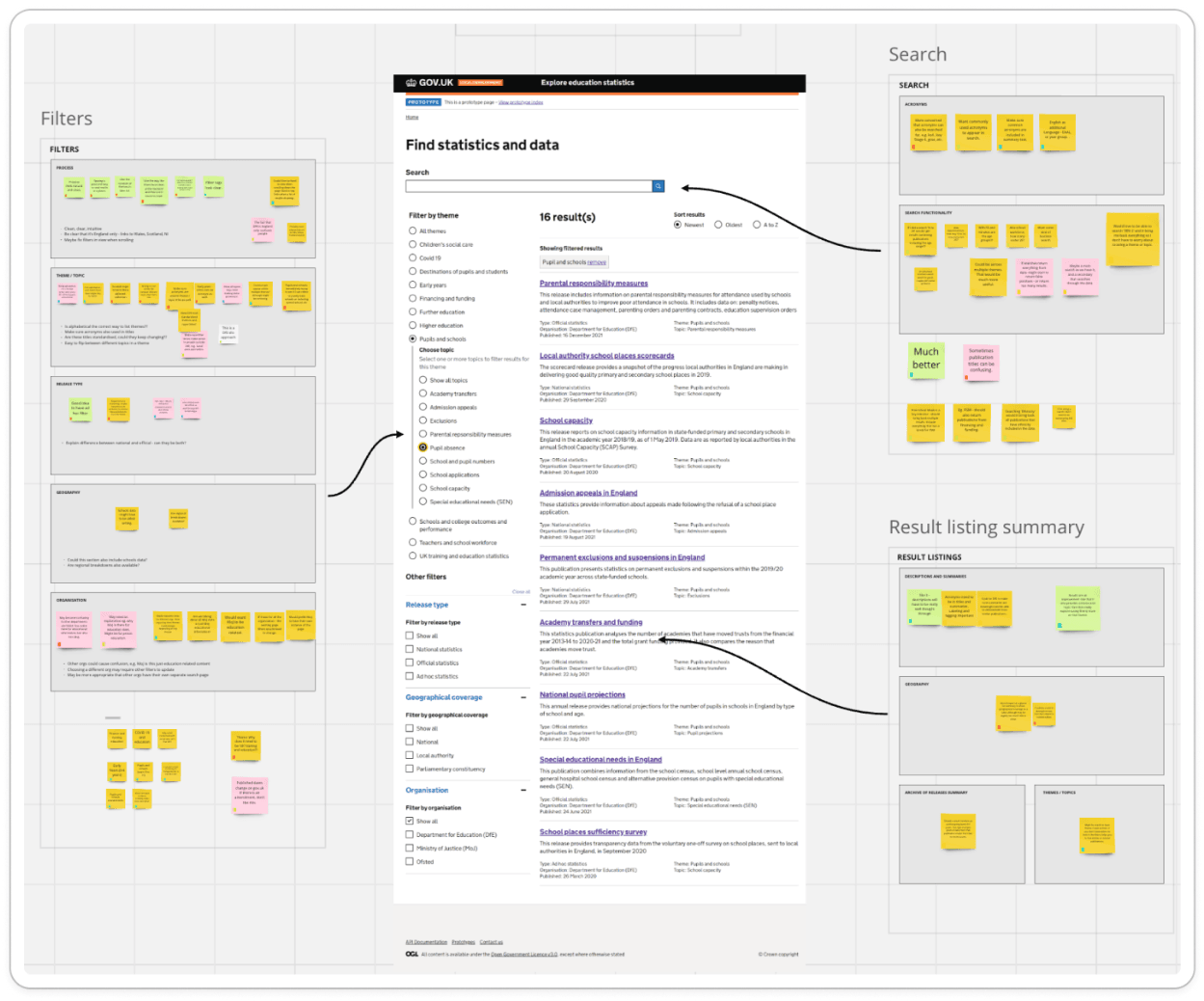
- most users found this concept to be an improvement on the original version, being more intuitive to use.
"Really easy to use, intuitive, like the layout. It's a lot clearer to find and search for things, less intimidating and fewer clicks to find things.”
- the filters made sense to users and they could see results immediately appearing
“I like having filters that change the list on the right. The filters make sense, it's a common pattern”
Pain points
- new users unfamiliar with this type of data were unsure which theme they’d expect to find certain types of data.
"FE, HE and schools and college, I don’t know how to break them down in my head"
- when selecting a theme, a series of sub-topics become visible to further filter results. However some users were unaware that the sub topics were available as filter items.
"Not clear if there are sub topics until you click a theme. If I knew there were subtopics it might make choosing a bit easier."
- some users expected further guidance around themes and topics
"Slightly too granular for my understanding. would expect a tooltip on the themes."
- some users thought the search feature and the filters were separate functions and not related to each other at first glance.
“If you're a data scientist and you know exactly what you want, showing results may be distracting.”
Prototype iteration 2 (May 2022)
Based on the findings from prototype 1 we continued to iterate the design building on the positives and making changes to try and overcome the known ongoing pain points.
Screenshot showing prototype iteration 2
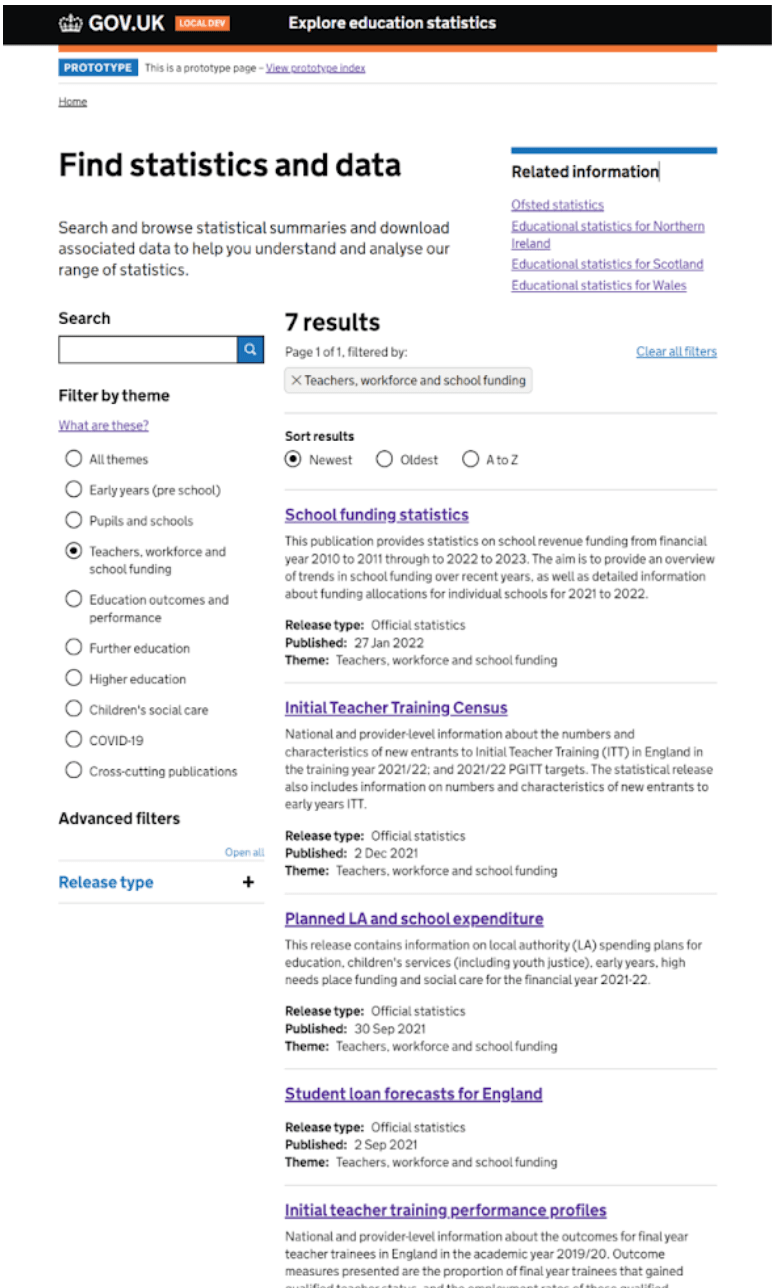
Changes in this version included:
- removing the concept of sub-topics from the filtering, this simplifies the page layout and reduces cognitive load, due to no unexpected options appearing. Users generally prefer to have fewer choices to make
- adding extra guidance that appears as a modal to explain themes and the different release types
- aligned the search above the filters on the lefthand side of the page, as search essentially acts like a filter to show relevant items in the list of results
Usability testing findings
We tested this prototype with a range of users including external professional analysts from a range of Local authorities, data managers from schools and academies, lay people who had never seen or used the service and internal users from the DfE stats production teams.
- the concept was intuitive to use for the lay person, and they were able to discover information they found useful
"Enjoyed using it, now I've seen it, really curious to see what other info is out there. Especially parents looking for schools for children, or someone looking to get into education, it’s a good place.”
- the search and filtering positioning worked well and was inline with user expectations
"Seeing the search function feels quite relieving, means I don't have to scroll through all the results. Like being able to search by theme, can shorten the user journey by using filters."
- the summary text on the results was helpful, and provided more context, rather than relying on titles alone.
Pain points
- some of the theme headings aren’t self explanatory, and require trial and error to find the relevant results
"Education outcomes and performance, wouldn't know what was in that. Early years, pupils and school, FE and HE seem to be mixed with other categories"
- non expert users struggled with some of the language, especially where acronyms or technical terms are used without any explanation or more commonly used alternatives.
"Would never have known GCSE was also KS4. Providing alternatives to technical terms would be very useful"
Version 2 (Live January 2023)
Screenshot showing version 2
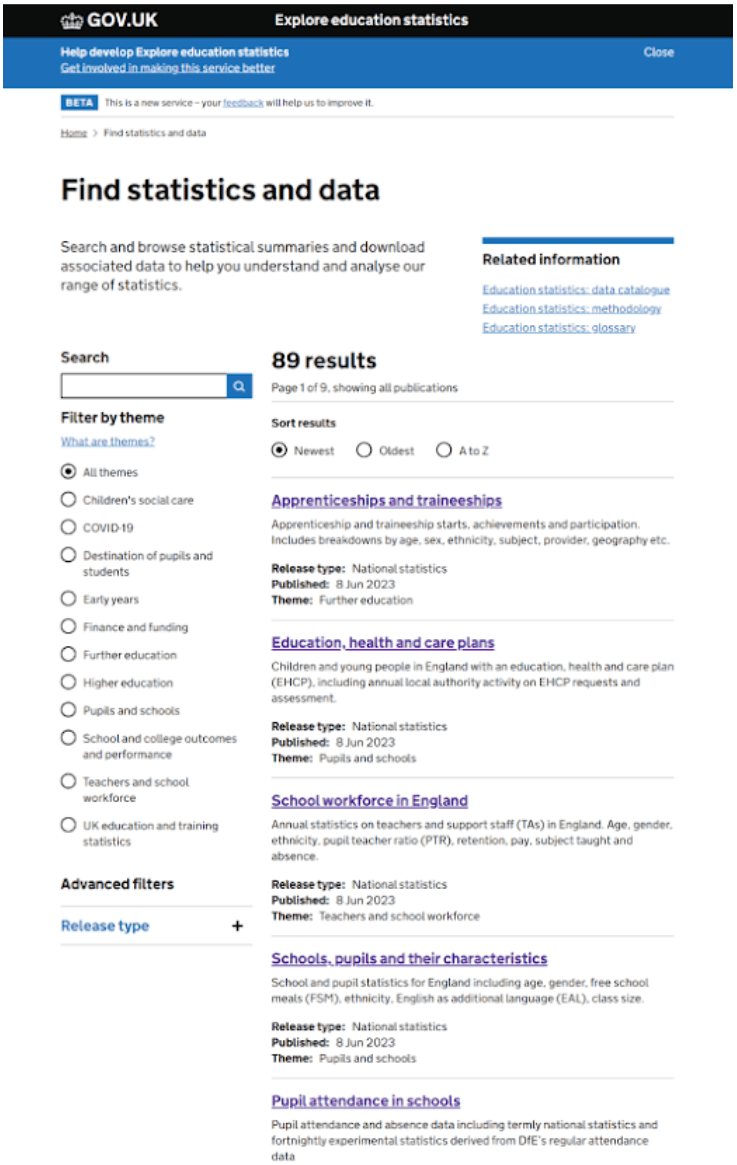
The updated version of the find statistics page was released in January 2023.
At this stage we were still aware of the limitations of the underlying search. However, user research showed there was still be a big advantage in the new design over the previous version.
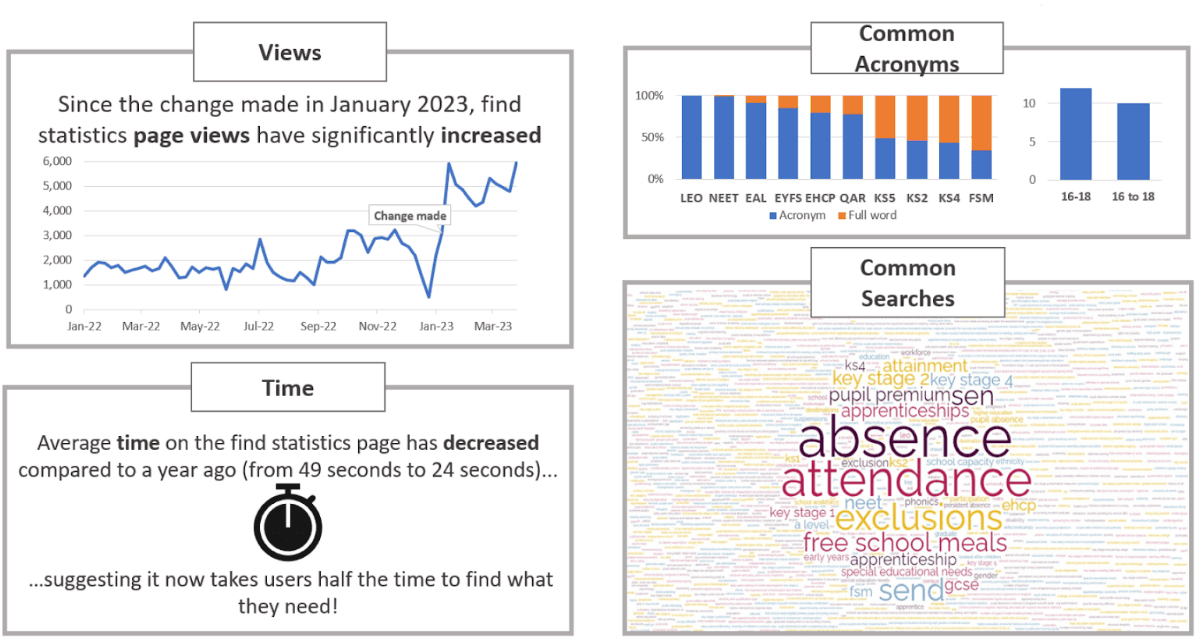
After making the update we saw positive changes in the analytics showing significant improvements in page views and users spending less time searching, suggesting they were finding what they needed more quickly.
Snapshot of high level analytics after launching new version
Version 3, incorporating search improvements
The development team had been testing Azure AI search on a technical prototype. The main limitation of the previous versions of ‘find statistics’ search was that it lacked any intelligence and required a ‘like for like’ match on either a term in the title or the summary paragraph.
Azure AI search allows for an in depth search of the term(s) and also potential alternatives (e.g. a search for GCSE should also return the new terminology of KS4). The Azure search also provides a deep search into all content across the site, so it is no longer limited to matching just titles and top level summaries, hence providing a far more comprehensive and relevant set of search results.
Proof of concept
The screenshot below show a basic working template showing a proof of concept, this was an un-styled example to prove that it could work with the data included within the EES service.
Screenshot showing proof of concept
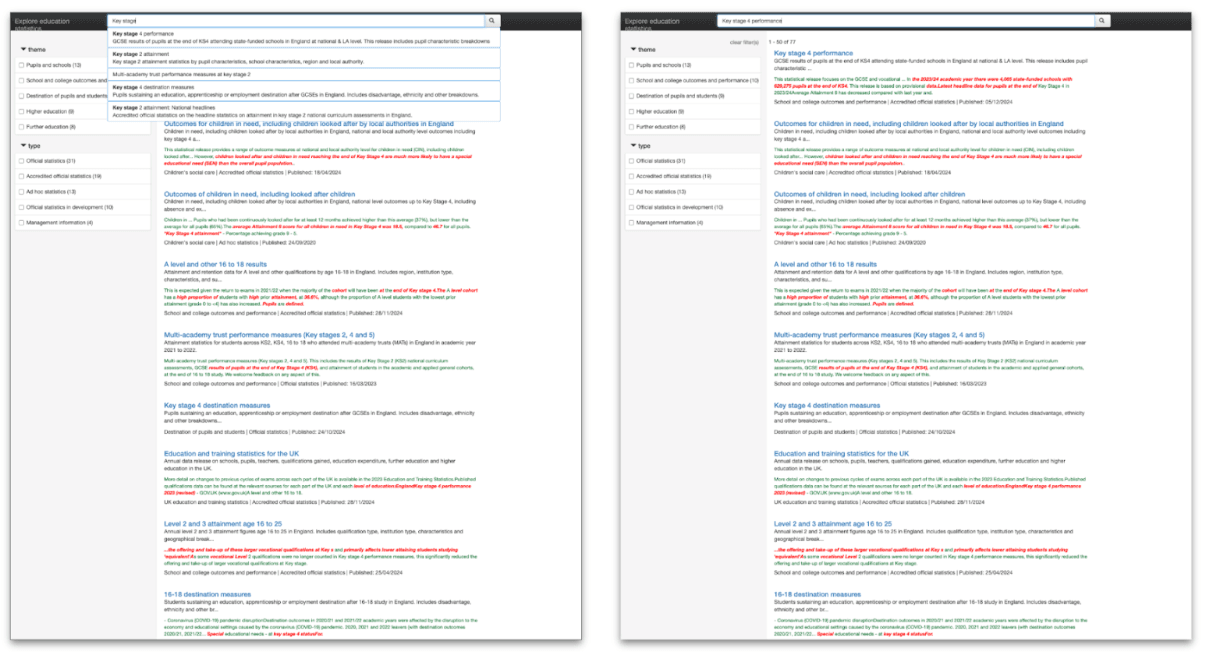
This concept included:
- type ahead functionality
- relevance of search terms
- dynamic filter options based on returned results
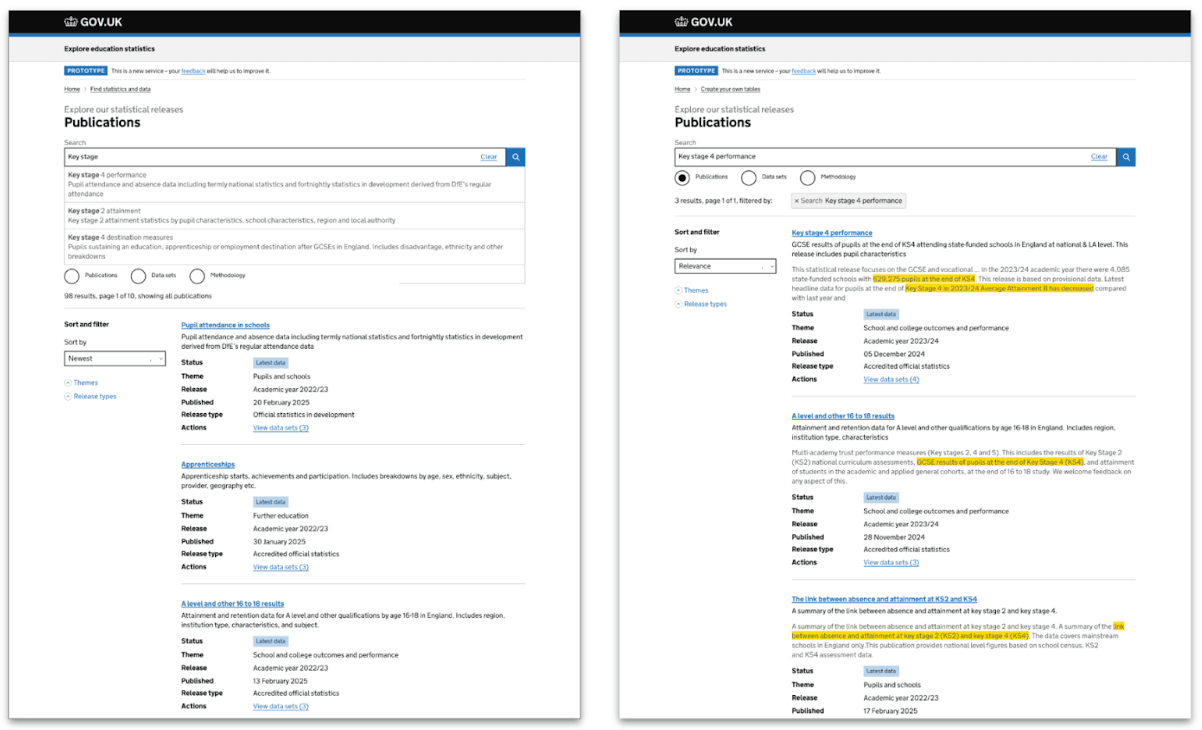
We then made a prototype using the GDS design system components ready for the next rounds of usability testing.
Screenshot styled prototype with Azure AI search
Usability testing findings
We tested this prototype with a range of users including external professional analysts from a range of Local authorities, Data managers from schools and academies, and internal users from the DfE stats production teams.
- generally feedback was very positive, particularly around the typeahead search functionality
"Type ahead - it's just time saving, isn't it? That's really nice because sometimes you type things in and it's not the right title"
- users found that highlighting relevant terms in the results made it very clear
“I think it's easier to look through and find the one that I want.”
- most users found it clear and simple to use
“It’s reducing the cognitive load, it feels familiar, it's easier”
Version 3 (Live June 2025)
Screenshot of version 3 of the Find statistics page
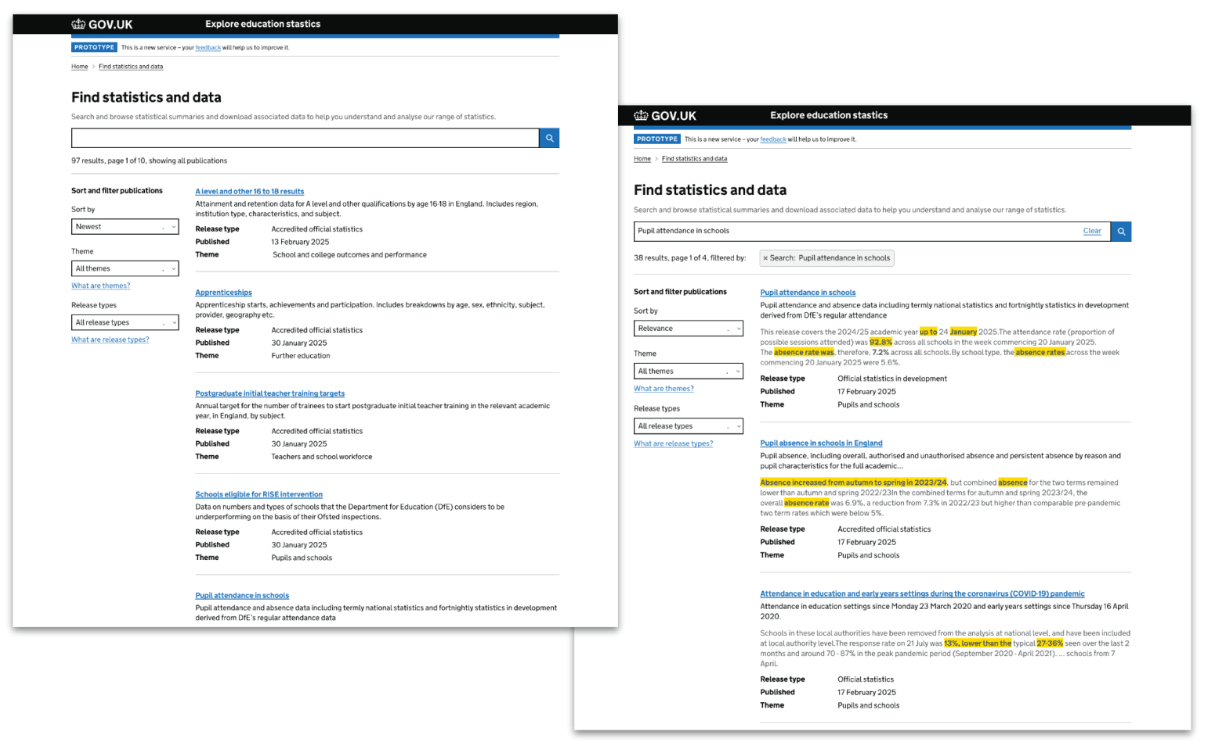
This latest version now incorporates a far more improved search functionality allowing users to quickly get to more relevant information.
Further on going research
Why are we doing this?
We are aware of existing pain points around categorisation of publications into thematic areas. If searching by themes alone some users are unsure which theme they’d need to look in to find a particular publication
“Education outcomes and performance, wouldn't know what was in that”
“If I was looking for GCSE, I wouldn't know which theme to try first.”
How we did this research
- invited users to participate in a card sorting exercise - they categorised publications into groups that made sense to them
- each user was given a random selection of 50 publications from the current site.
- we had 28 responses
- respondents created 253 categories (55 once standardised) and many more valuable insights
Next steps
- we are analysing the standardised categories to identify strong patterns and areas of consensus across users
- these insights will be used to propose a refreshed set of themes for EES that better reflect users’ mental models
- the proposed themes will be reviewed internally and iterated on before being validated with users in follow-up research
Design iteration - Next steps
Currently the service allows users to search for publications via ‘Find statistics’ or search for underlying data via the ‘Data catalogue.’
We have been working on prototypes to investigate if we can consolidate these 2 separate pages into a single unified search, hence reducing points of entry and allow users to select the type of information they need up front.
Users would be able to toggle search results between showing publications or showing underlying data downloads - giving direct access to the table builder and API data sets as well as traditional data downloads in .csv or excel format.
Design crit
We will be carrying out a design crit session with the wider DfE design community, taking on board and responding to any feedback. Then we will continue with further usability testing