
The problem
When using GOV.UK Notify (referred to in this post as ‘Notify’) to send emails, each email is set up as a reusable ‘template’.
We initially used separate templates within Notify for each user group, even though the content was identical or very similar. This meant that instead of one template for a single email, we had four.
This was less efficient because:
- Developers had to code each template separately when integrating them into the build, increasing technical debt
- There were more email templates to manage
- Updates needed to be done manually across multiple templates, increasing the risk of human error and the amount of testing required.
What we did
We mapped every email template on a Lucid board. This allowed us to see each email side by side, so comparisons were easier to make. We identified where the content differed and focused on those sections.
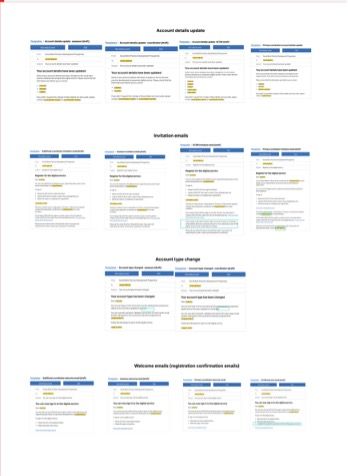
This showed us that for 4 emails, we had 14 templates.
The content designer ran a decision-making workshop with the whole team to discuss the Lucid board.
We worked with developers to understand what emails had already been integrated into the build, and to provide insight into how optional content could be implemented.
The UCD team reviewed insights gathered from user research and were able to provide background to the original content rationale.
In the workshop, we made decisions on the content that differed within the templates:
- If there wasn’t a need, we removed the content.
- If the content was still relevant, we either kept the existing template as is, or used optional or personalised content to accommodate it within an existing template.
Personalised content means that each email is tailored to the user, as we add details that are relevant to them, however the email itself can exist as a single template. For example, we used ((account-type)) as personalisation to be able to differentiate between user groups in the content itself.
Optional content is another way of tailoring emails – instead of filling in specific details each time an email is sent, you can show parts of the content in the template to a specific user group and hide it for others.
We explored another option to combine content for multiple user groups in one template (e.g., ‘If you’re a social worker you need to...’). This approach was rejected because it added unnecessary content that some users might miss and therefore potentially reduced clarity.
Outcome
After reviewing all our email templates, we decided to:
- Reduce the invitation email (inviting users to the service) templates from 4 to 2.
- Reduce the welcome email (confirming that a user’s registration was completed) templates from 4 to 1 by using optional content within Notify.
Before:
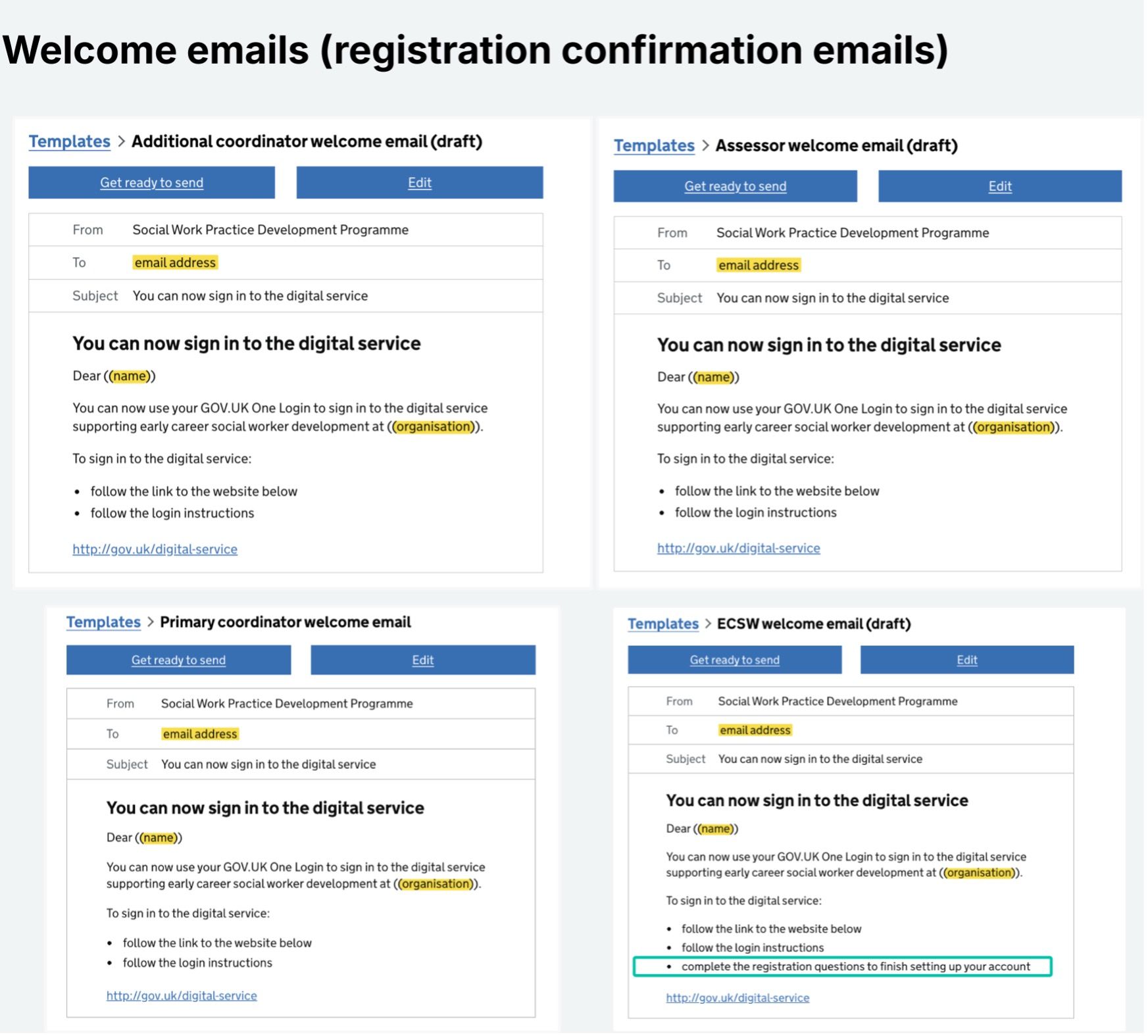
We identified that the only variation in these messages was a single line, illustrated by a green highlight.
When aiming to consolidate the emails, we had to understand content intent by focusing on the email’s initial purpose which was to:
- Encourage use by explaining what the service offers
- Give clear instructions on how to return to and access the service.
After:
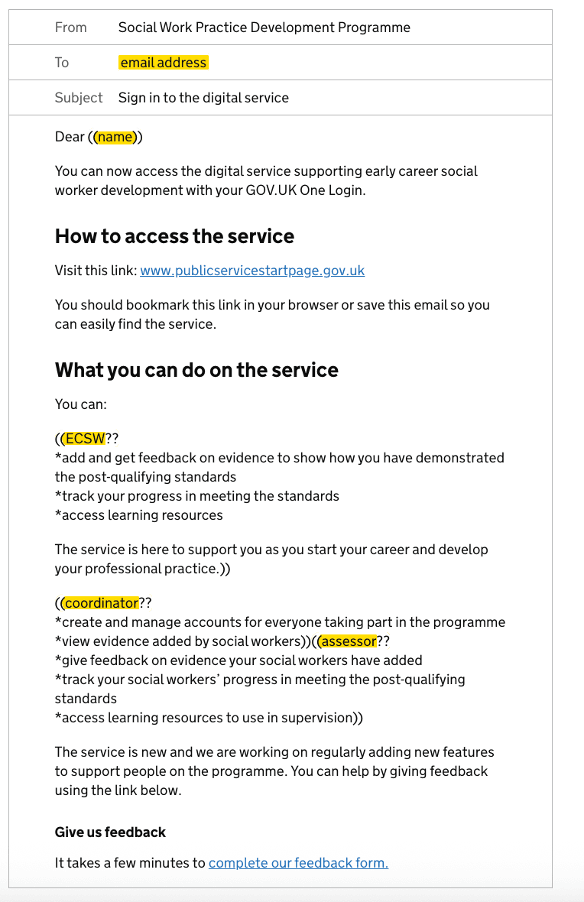
We were able to use a single template for this email by using optional content. For each person we sent the message to, we would specify ‘yes’ or ‘no’ to show or hide the optional content. In this instance, we were asking whether the user was any of these account types: early career social worker, coordinator, or assessor.
The impact this had:
- Easier to map emails on journey boards
- Improved understanding of what emails we used in the service
- Easier to manage emails within Notify
- Less resource used to document key details about the emails
- Reduced build time, with the welcome email now functional and integrated into the build.
What we learned:
- Optional content is easier to set up than expected and uses the same process as personalisation
- Clear documentation is essential for managing templates within Notify, to ensure that key details are not lost when discussing email strategy
- Limiting the number of templates used in the service means that the content in them must be exact, with a clear purpose. This encouraged us to simplify the content and remove information that was not relevant
- There are still instances where it is not possible to consolidate all the templates for an email by using optional content – careful consideration is needed to ensure that the user’s needs are met and prioritised.
Next steps
We want to:
- Monitor feedback and the performance of the emails in private beta to ensure the changes meet user needs
- Continue updating our Confluence page on in-service emails to monitor the number of templates we’re creating
- Continue adding emails to journey maps and service blueprints to have visibility of what communications the user receives
- Apply optional content thoughtfully in future templates.
For links and passwords to the prototypes discussed in this post, please contact the team at SocialWork.DIGITAL@education.gov.uk.