
Context
When users navigate to the 'Check an early years qualification' service, they answer several up-front questions. They are then taken to the ‘Select a qualification to check’ page (the results page). This page displays all qualifications matching the information they entered.
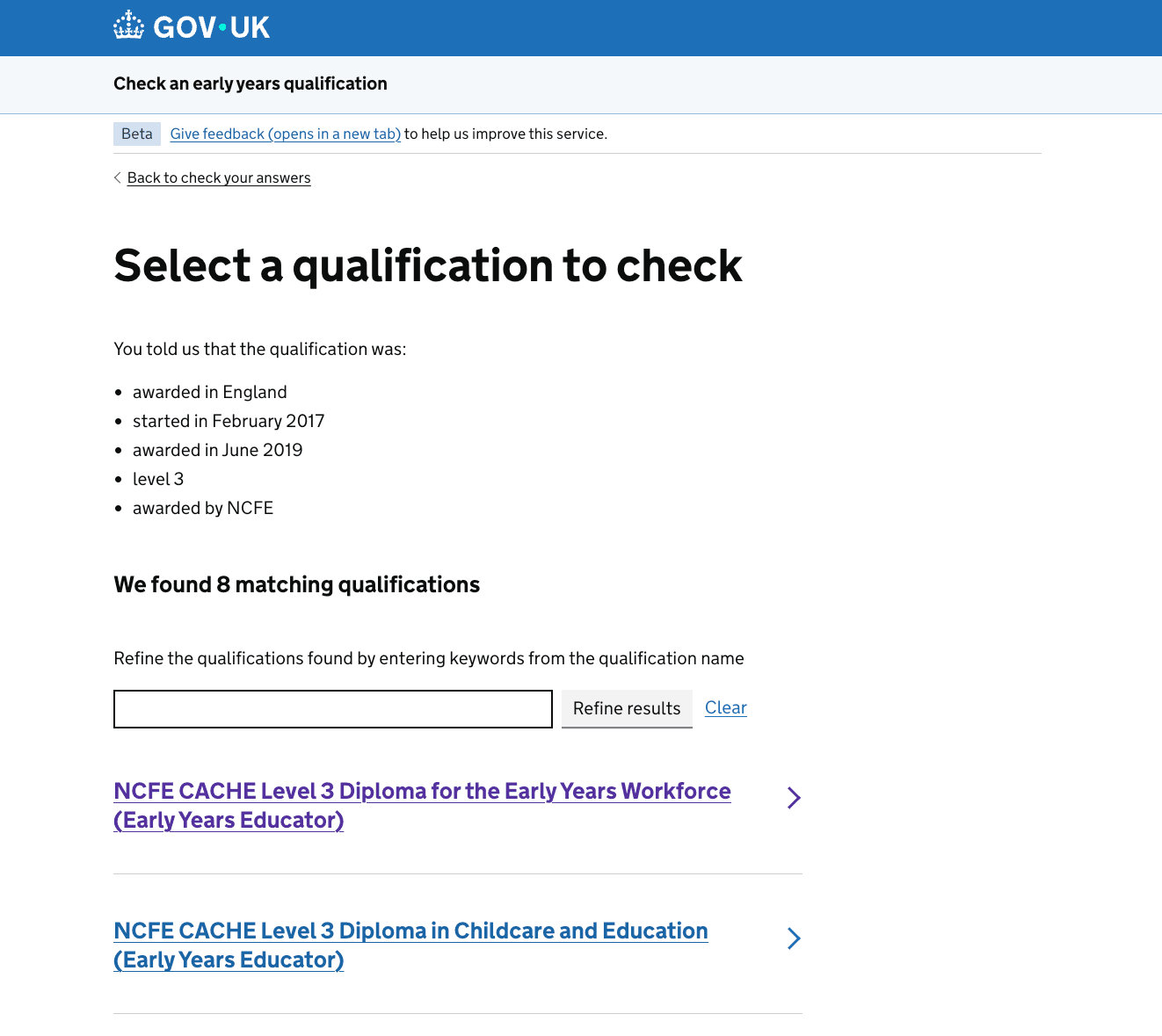
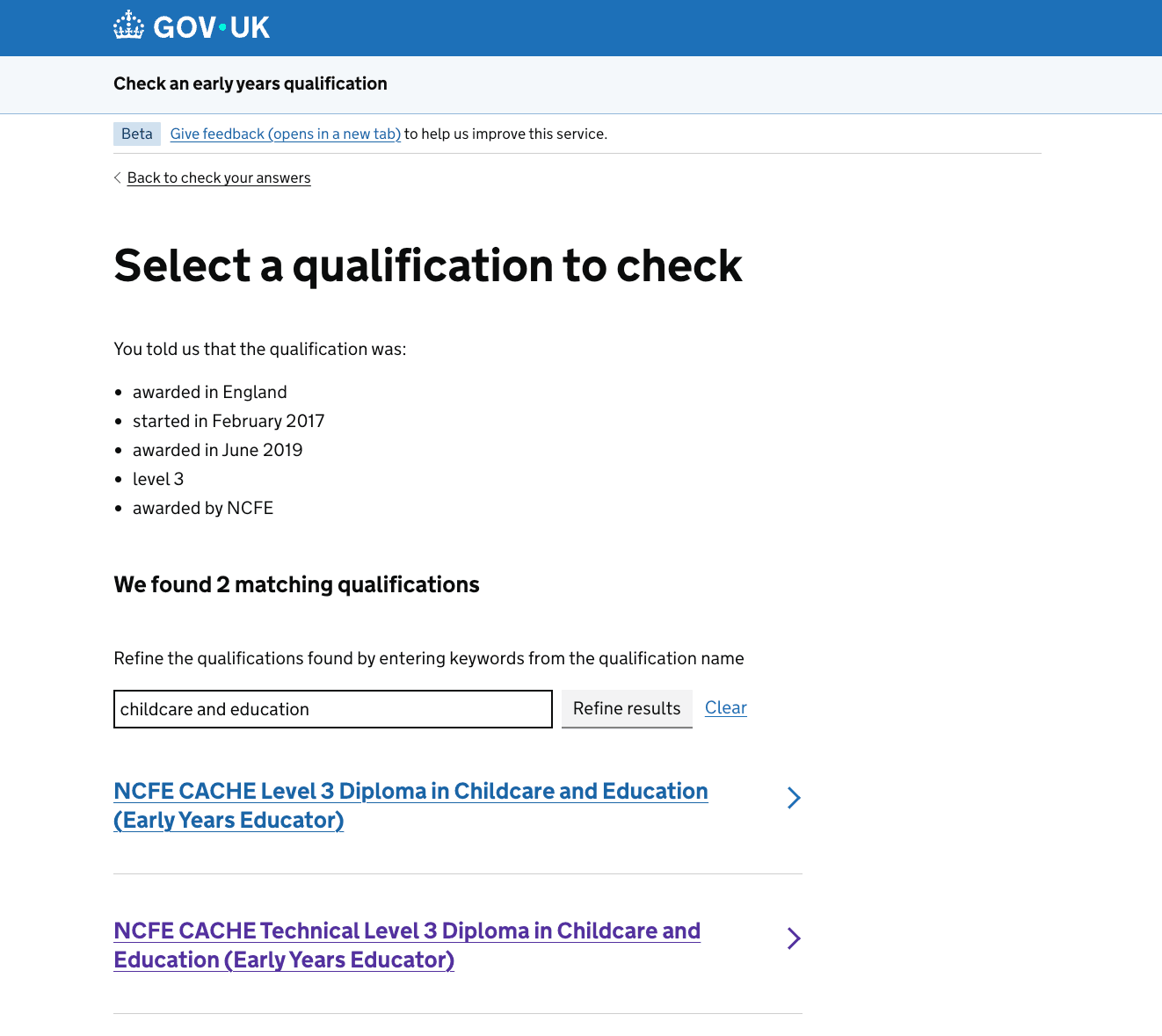
On this page, users can narrow down their results by entering keywords from the qualification name into the search bar. The heading ‘We found X matching qualifications’ updates automatically as they filter.
The problem
In moderated research sessions, users frequently entered full qualification names into the search bar. They assumed the search bar searched across all approved qualifications in the service, rather than filtering the results displayed on the page.
Evidence from Google Analytics
To understand how widespread this behaviour was outside research sessions, we analysed 6 months of Google Analytics data. This evidence would help us decide whether to remove the search bar or make its filtering purpose clearer.
User interaction with the search bar
This analysis revealed that around 42% of unique users interacted with the search bar.
This suggests that the search bar plays an important role in helping users navigate the qualifications returned by the service, rather than being a feature that is rarely used.
We also looked at the outcomes of searches. Overall, 84% of searches returned at least one qualification, while 16% returned no results.
Most searches returned at least one qualification, which suggests that users are generally able to find relevant results when using the search bar, even if they do not always understand its scope.
Search term length
While this data showed that the search bar was widely used and generally successful in returning results, we wanted to understand whether users understood its purpose.
We also exported the search terms entered and calculated their length to find out whether users were entering too many words in the search bar, which would have suggested that they were entering the full qualification name.
This analysis showed that users had entered a total of 4,363 different search terms. This figure counts variations in formatting as separate searches. For example, "NNEB" and "nneb" are counted separately.
Out of those 4,363 search terms:
- 51.95% of unique searches contained 5 words or more
- 40.04% contained 6 words or more
- 30.52% contained 7 words or more
- 23.03% contained 8 words or more
These long, highly specific search queries confirmed that many users were treating the search bar as a global search tool rather than a mechanism for filtering existing results.
Assessing the impact of removing search
Although these findings suggested users misunderstood the search bar, they did not tell us whether the search functionality was still necessary. To understand the impact of removing it, we explored how many qualifications users might need to filter in different scenarios.
We tested several scenarios in the service to determine the maximum number of matching qualifications a user could see:
We found that:
- users checking a level 2 qualification started before September 2014 could see up to 20 matching qualifications.
- users checking a level 3 qualification started before September 2014 could see up to 35 matching qualifications.
- users who did not know the qualification level and were checking a qualification started before September 2014 could see up to 79 matching qualifications.
Because users could face up to 79 qualifications on a single page, removing the search bar would make comparing large results sets significantly harder.
Recommendations
Based on this evidence, we decided not to remove the search bar. Around 42% of unique users interact with it, and, in some scenarios, users may need to compare up to 79 matching qualifications. Removing the search function could therefore make it harder for users to find their qualification.
However, the research and analytics showed that some users misunderstood the purpose of the search bar. We therefore focused on making its purpose and scope clearer, so users understand that it only searches within the qualifications that match the information they have already provided.
Design iterations
Clarifying the search scope
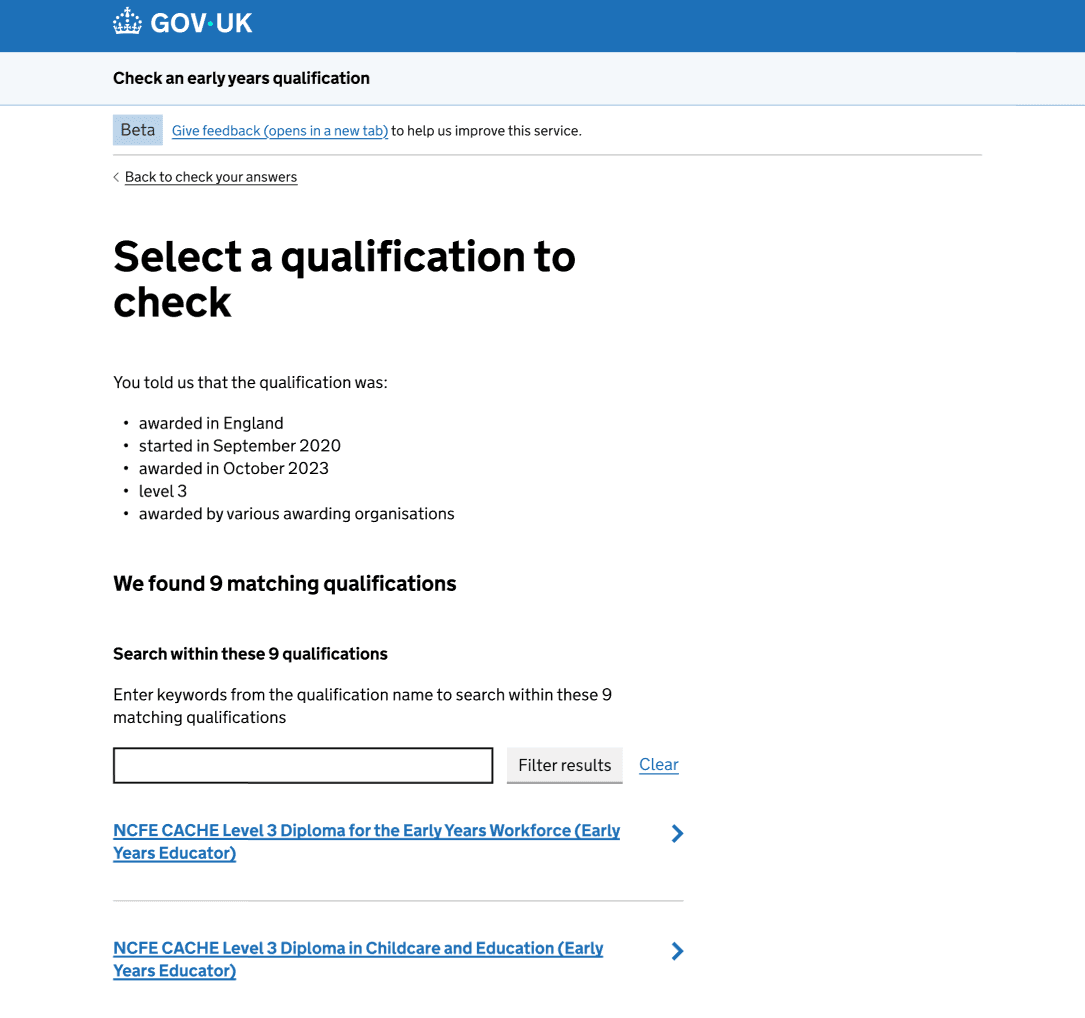
We added a ‘Search within these X qualifications’ heading below the ‘We found X matching qualifications’ heading.
This established a clear page hierarchy, emphasiszing that the search operates exclusively within those initial results.
Explaining that search filters existing results
We also updated the content above the search bar to ‘Enter keywords from the qualification name to search within these X matching qualifications'.
This reinforces the idea that users are narrowing down the matching qualifications found, not the full list of early years qualifications. The previous content ‘Refine the qualifications found by entering keywords from the qualification name’ did not seem to be obvious to users. Users appeared to think they were searching rather than refining results, and ‘within these X matching qualifications’ constrains that expectation.
Using clearer language for filtering
We changed the button label from 'Refine results' to ‘Filter results’. This makes it clearer what the search bar does and aligns better with users' language and with the web version of Early years qualification list where users can 'Apply filters'.
Providing feedback on filtered results
After filtering, we added ‘Y of X qualifications matches "[keywords-entered]”.
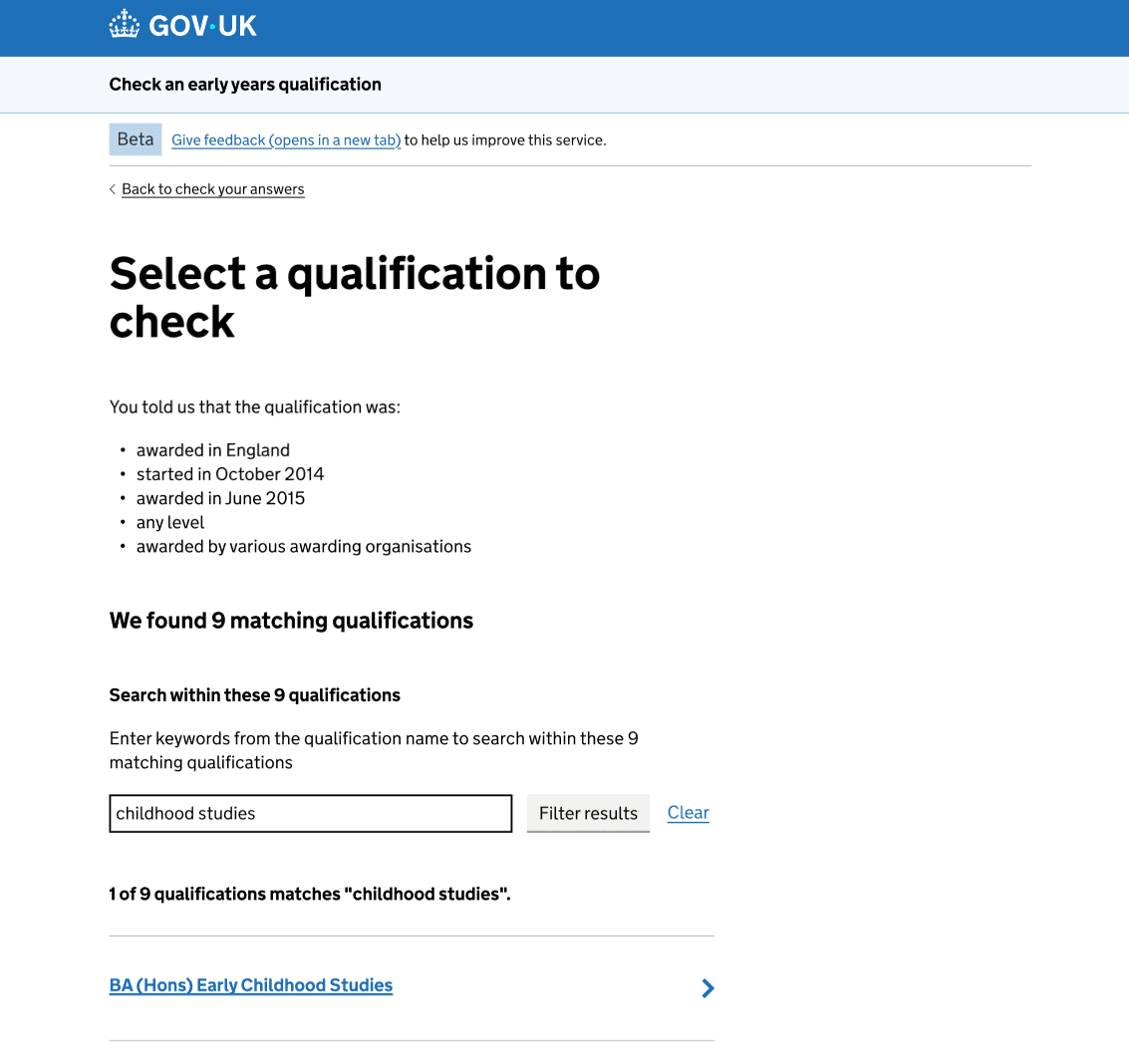
We deliberately kept the ‘We found X matching qualifications’ heading static after users filtered the results because it reflects the qualifications that match the information they provided on previous pages. However, users still needed feedback about the number of matching qualifications after filtering.
This also reinforces the mental model we are trying to teach users: the search bar filters the matching qualifications rather than searching across all approved qualifications.
Improving the no-results experience
While reviewing these changes, we identified a critical edge case. Some user journeys (such as checking a Level 4 qualification started on or after September 2014) return 0 initial matching qualifications.
On the original page, users with 0 initial results were still prompted to search and refine and were shown guidance on how to improve keyword searches. Because no search had actually occurred, this guidance was misleading and confusing.
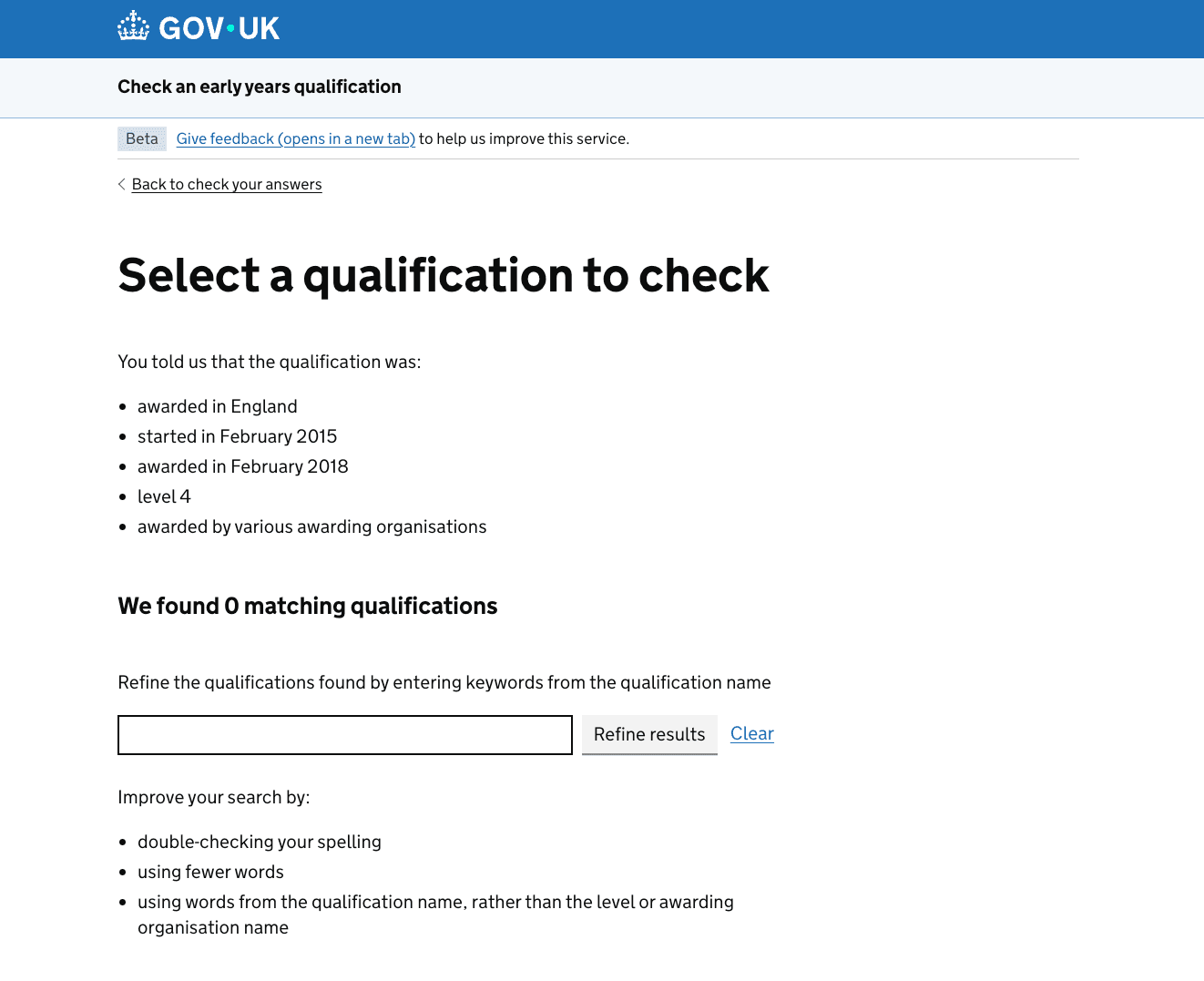
This experience would have been worse with the iterations we planned to implement as users would have been prompted to search within the 0 qualifications found.
Designing a dedicated no-results state
To solve this, we created a dedicated no-results state by:
- updating the heading from ‘We found 0 matching qualifications’ to ‘No matching qualifications were found’
- removing the search bar, search label, and irrelevant search advice
- adding tailored guidance explaining why no qualifications were matched and what steps the user can take next
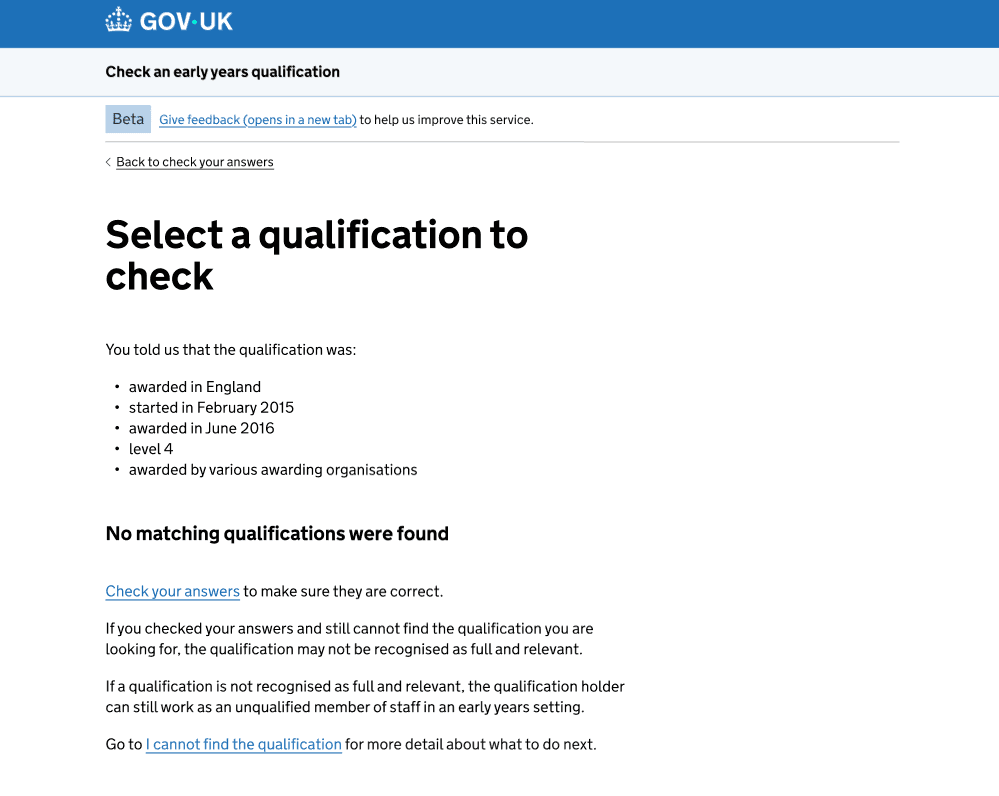
Updating the heading:
- reduces cognitive effort because it states the outcome directly
- supports the idea that this is a different state rather than a normal results page
- makes it feel more like a status message
- naturally introduces guidance about what to do next
We decided to remove the search bar because keeping it visible added unnecessary interface clutter. More importantly, users may interpret it as a global search tool rather than a filter for the current results set. When no results exist, the search bar cannot fulfil either expectation, creating confusion and increasing cognitive load.
Lastly, adding more tailored guidance gives users clear next steps and helps them understand what they can do when no qualifications are found. It also reduces uncertainty by explaining that, if the qualification does not meet the full and relevant criteria, the qualification holder can still work as an unqualified member of staff.
These changes create a clearer distinction between a results page and a no-results state. They remove unnecessary search controls, provide more appropriate guidance, and help users understand what to do next.
Next steps
To evaluate whether these changes improve user understanding and navigation, we will:
- monitor Google Analytics to see if search query lengths become shorter and less specific
- watch Clarity recordings to verify whether users recognise that search only filters the displayed results
- monitor whether the number of searches returning no results decreases