
Context
The early years qualification list (EYQL) spreadsheet and the Check an early years qualification online service both list all the qualifications approved by the Department for Education (DfE) as full and relevant to work in the staff:child ratios in England.
The spreadsheet was introduced first. It is still considered the main source of truth and is available to download in Microsoft Excel format. In March 2025, we launched the online service, a solution that provides a more user-centred experience.
Unlike the spreadsheet, the online service guides users through a series of questions to help them find the most accurate result. It also provides tailored guidance on what to do next if a qualification is not full and relevant.
Users survey
Since launching the online service, we had continued to see high numbers of spreadsheet downloads. To understand why, we ran a survey with early years professionals in October 2025.
More than half of respondents who had used the online service said they had also downloaded the spreadsheet. This suggested that spreadsheet use was not necessarily driven by dissatisfaction with the online service.
The survey showed that users value the spreadsheet because it is easy to access, can be used offline and can be shared with others. Respondents commonly shared it with colleagues, senior team members and candidates during recruitment and onboarding.
Users told us that sharing the spreadsheet helped them work collaboratively, build knowledge across teams, support recruitment activities and provide evidence that a qualification was suitable for working in an early years setting.
Some users also did not feel confident relying on the online service as their only source of qualification checking. They told us that results could sometimes feel unclear, or that they were unsure whether the information entered into the online service was correct.
This finding was supported by our May 2026 service feedback survey. Among respondents who had used the online service (63% of all participants), 56% said they also used the spreadsheet. The most common reasons were to double-check results and because the spreadsheet was perceived as easier to use in some situations.
Constraints
We cannot remove the spreadsheet entirely.
There is a legal requirement to publish the full list of approved early years qualifications on GOV.UK, so we needed a solution that would continue to make the complete list available.
The problem
Maintaining qualification data in 2 places
Although the spreadsheet and the online service contain the same information, the data must be maintained in 2 different places.
When a qualification is added to the EYQL, the policy team updates the spreadsheet and then informs the digital delivery team. The delivery team must then update the online service separately. Both changes need to be published at the same time to keep the information aligned.
This process:
- duplicates effort across teams
- creates dependencies between policy and the delivery team
- increases the risk of inconsistencies between the spreadsheet and the online service
- adds delays to publishing changes
We wanted to reduce these risks by creating a single source of truth for qualification data.
Limitations of the spreadsheet
The online service provides users with a clear result for their check, but the spreadsheet relies on users' interpretation to know whether a qualification is full and relevant, and what additional requirements may need to be met.
For example, when we first tested the online service with users, they were surprised to be asked for the start date. They thought it was a new requirement introduced by the online service. In fact, the spreadsheet already asked for it, but users had mistakenly relied on the award date, because the award date is readily available on the certificate while the start date is not.
As this spreadsheet is downloaded by users, it is difficult to understand how users interact with it because we can only measure downloads.
The proof of concept
To understand whether we could create a single source of truth for qualification data, the development team carried out a proof of concept.
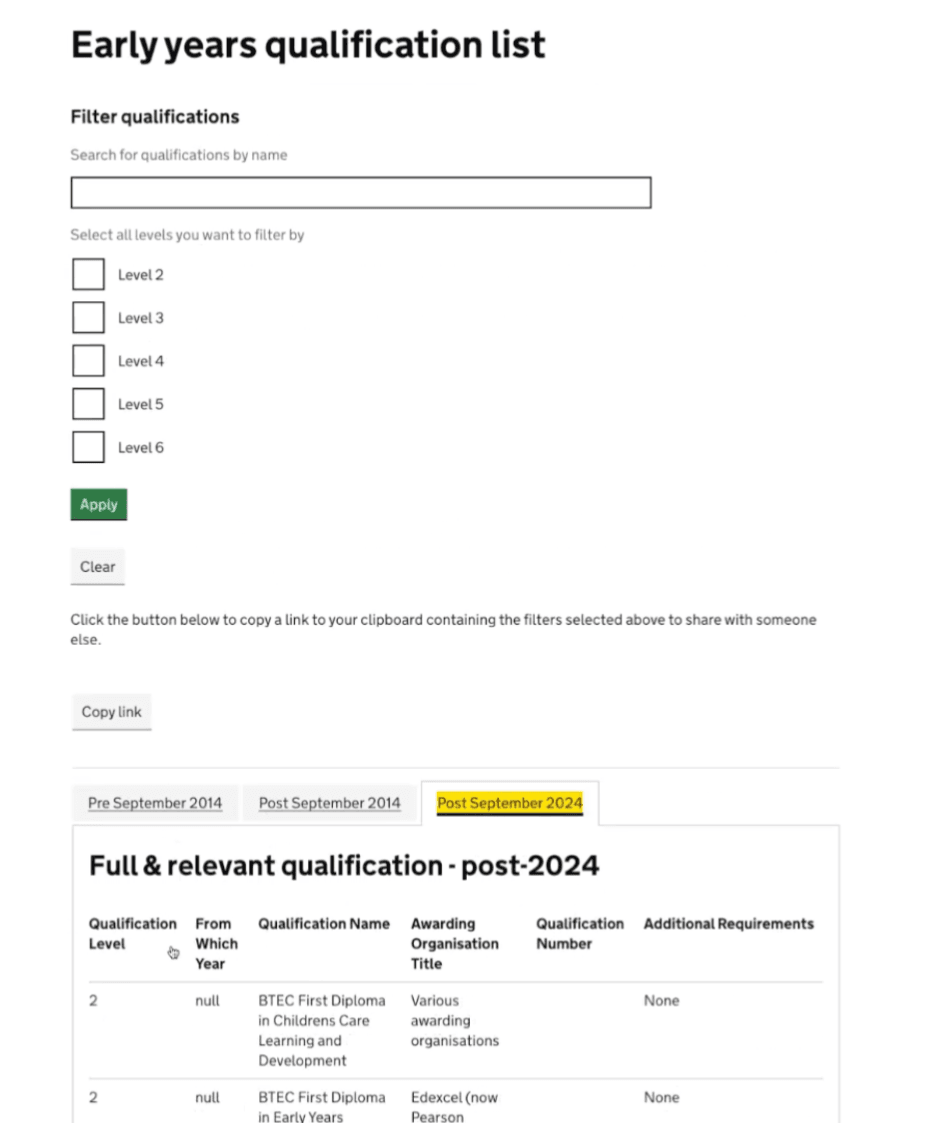
The aim was to investigate whether qualification data stored in Contentful could power both the online service and a WebView.
This proof of concept included a basic webview containing all the qualifications in a tabbed table, like the existing spreadsheet. Users could filter qualifications by name and level.
Operational benefits
This proof of concept demonstrated that the webview approach was technically feasible and would offer several advantages:
- qualification data only needed to be maintained in one place, removing duplicate effort
- data could be validated when entered into Contentful, reducing the risk of errors
- policy colleagues could make routine updates directly without relying on the delivery team
- both products could use the same underlying data source, reducing the risk of discrepancies
Analytics and learning benefits
Unlike the spreadsheet, a browser-based webview will allow us to understand how users interact with the qualifications list, giving us information on what qualifications they search for, the results they get and where they go next.
All these insights will help us make evidence-based improvements to the experience over time.
This proof of concept gave us confidence to move into the design phase.
Designing the webview
After being in conversations with the development team, discussing what users would need based on previous research and experience, and getting inspiration from other DfE services, we concluded that showing all qualifications at once and providing some filters would make users’ search experience much easier and more intuitive.
As a result, we agreed on showing the following:
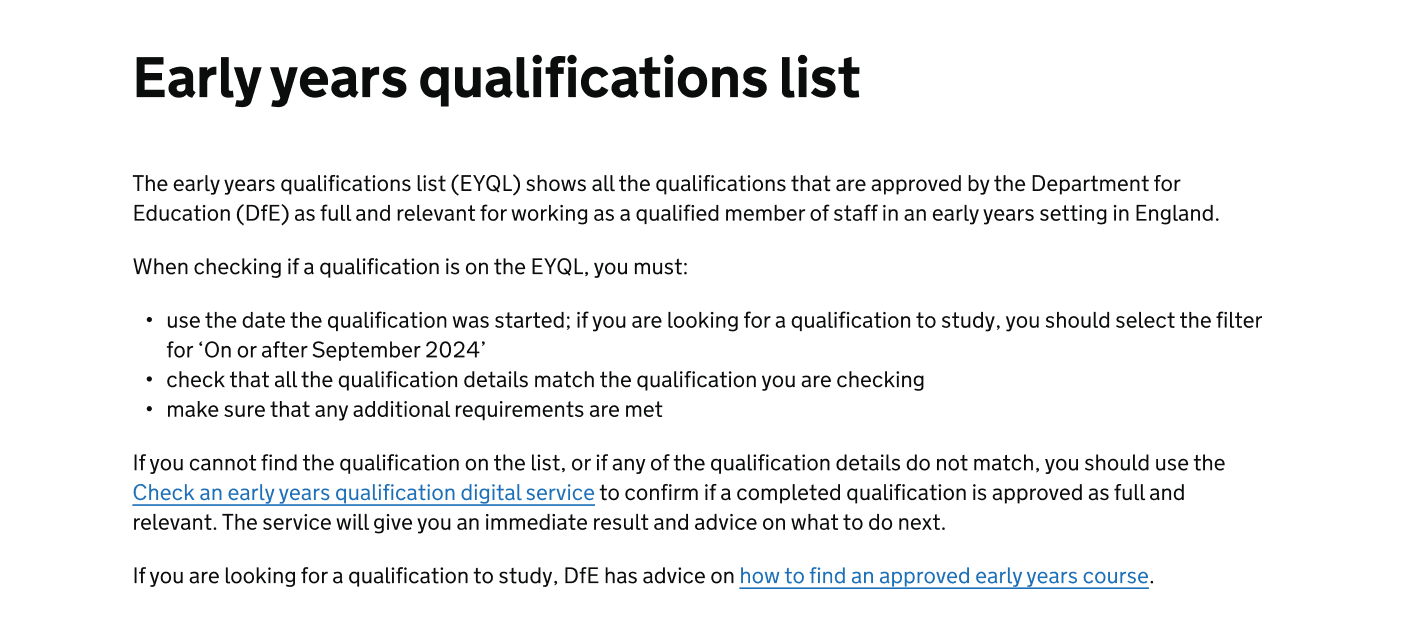
- some content at the top explaining what this list is, how to confirm if a qualification is full and relevant, and a button to download the full list
- some basic filtering functionality
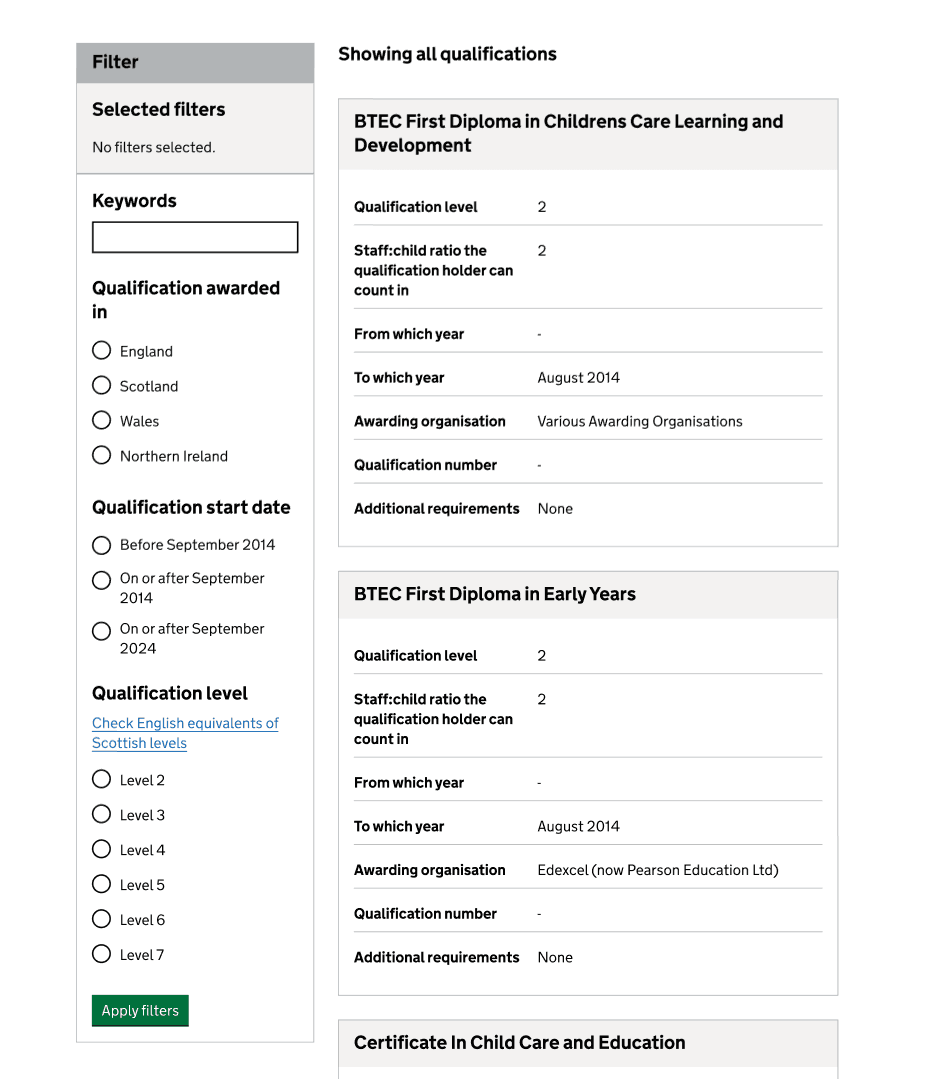
- all the qualifications presented in summary cards containing all the relevant qualification information
We chose summary cards because they create a clearer visual distinction between qualifications. This was especially important as each qualification includes additional details that need to be displayed. The card structure helps users quickly identify which details belong to which qualification and prevents the content from appearing as one continuous section separated only by horizontal dividers.
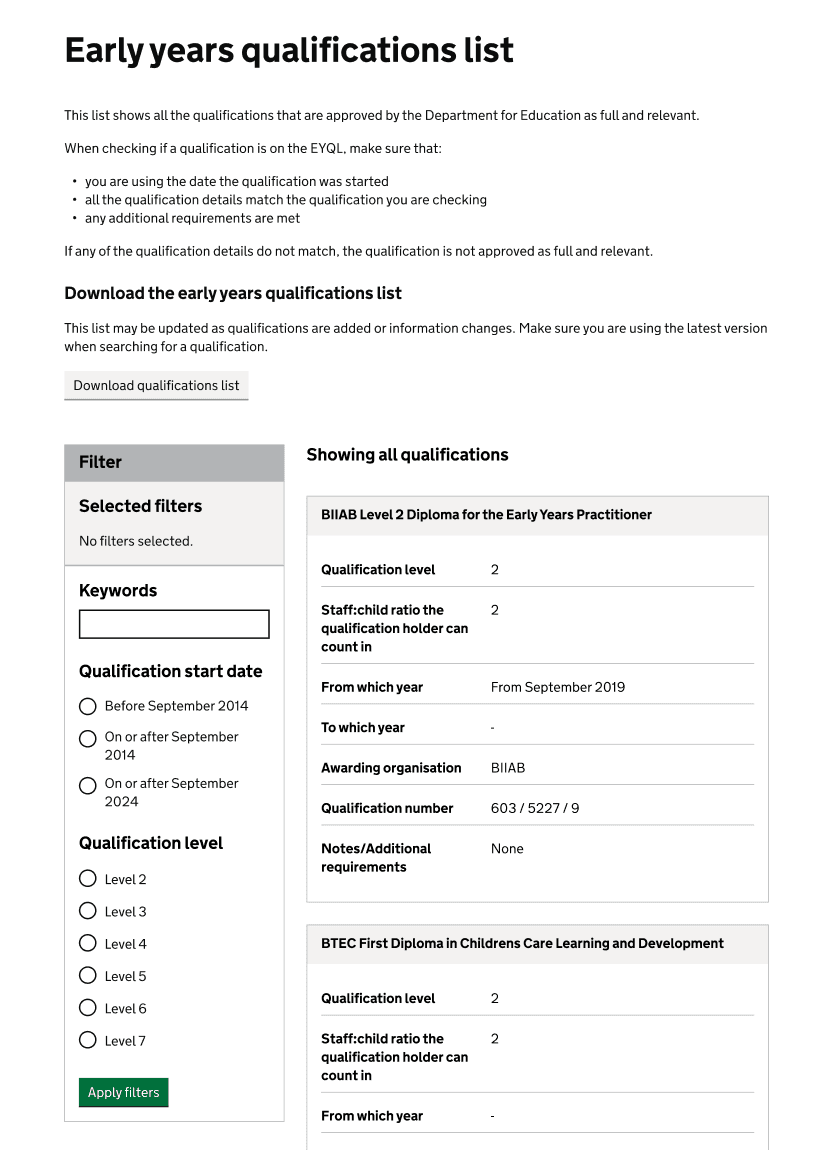
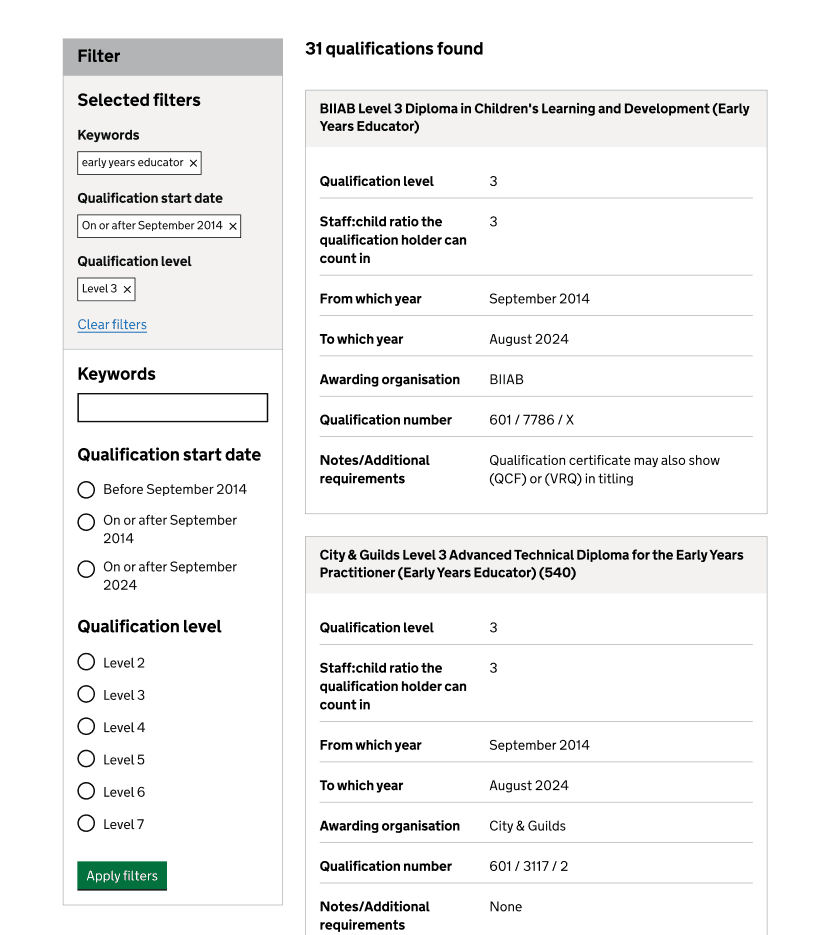
In this webview, users will see all qualifications at once and can apply filters to narrow down their options. These filters will appear as tags in the "Selected filters" section. Users have the option to clear all filters at once or remove them individually by selecting the cross icon on each tag.
As they apply or remove filters, they will see the heading with the number of qualifications found updated accordingly.
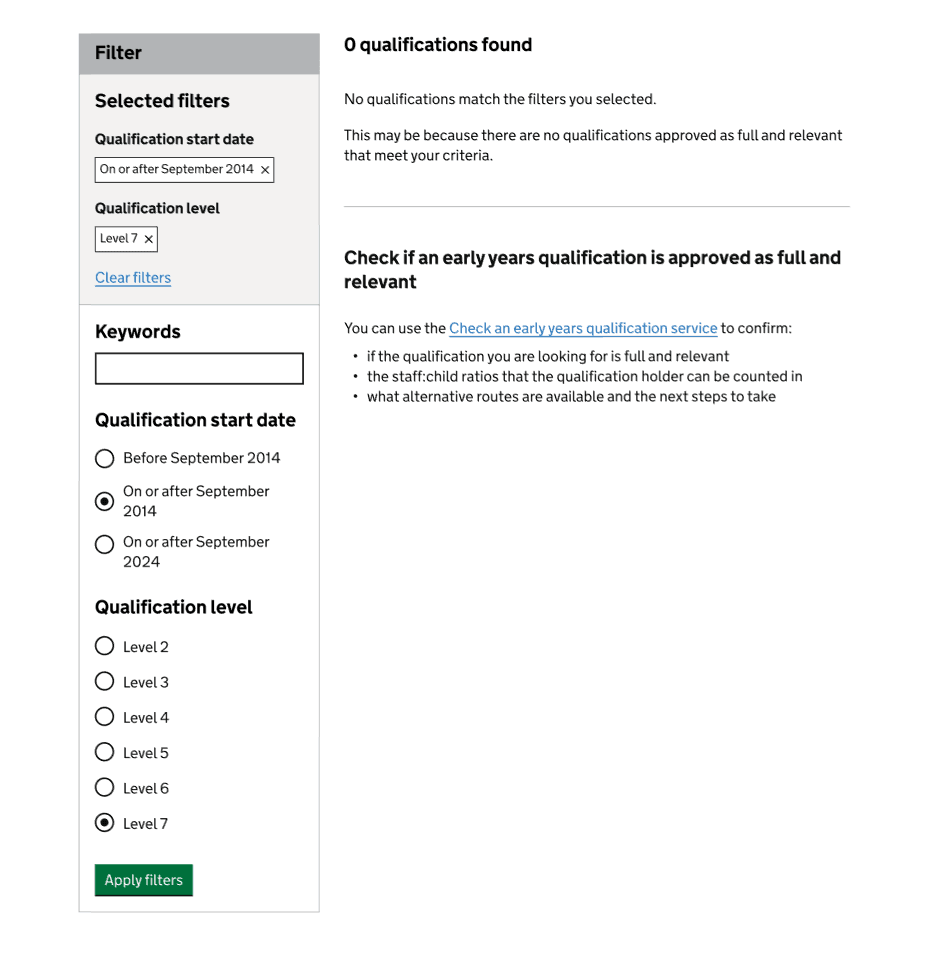
If user's search does not return any results, we explain why. We also include a section below the results list that links to the online service, where users can find additional guidance on why their qualification could not be found and what actions they can take next.
User research findings
We conducted moderated and unmoderated research with early years managers, practitioners and childminders. We aimed to assess if the WebView effectively supported users to find and interpret qualification information, and identify any usability issues, accessibility concerns or gaps in functionality.
The prototype we tested with users did not include the download functionality, but they all were asked about their expectations if they selected the download button.
Some of the main research findings included:
- most participants had no issues using the webview and finding what they were looking for
- the WebView was generally perceived as better than the spreadsheet
- some participants did not understand what ‘staff-child ratios’ meant and asked for clarification
- the download button met participants’ expectations, and all expected the list to be downloaded in a spreadsheet
Design improvements
Following research findings, we clarified the meaning of the ‘staff:child ratios’ term and updated it to ‘staff:child ratios the qualification holder can be counted in’.
Providing further guidance
Research showed that users who could not find their qualification were left without clear next steps.
To address this, we added content at the top of the page directing users to the online service, which provides a more accurate result and guidance on what to do next.
We also added information for people considering a career in the early years sector, explaining how they can use the webview to find an approved early years course. In addition, we included a link to the ‘How to find an approved early years course’ page, where users can learn more about full and relevant available qualifications.
Improving the devolved nations’ experience
Initially, users could not easily search for Scottish, Welsh and Northern Irish qualifications in the WebView. They could only apply limited filters and must browse through all matching results, as there was no option to filter by location.
To improve this experience, we added the ‘Qualification awarded in’ filter. This will allow users to filter results by location and better align the webview experience with the online service. Users who are already familiar with the online service will find this more intuitive.
Additionally, qualification levels in Scotland and England differ, making it difficult for users to know which level to select in the webview. To address this, we added the 'Check English equivalents of Scottish levels' link below the ‘Qualification level’ filter heading so that users can navigate to a newly created page where we provide guidance about SCQF levels. This way, users will feel more confident in the level they need to select.
Next steps
We will monitor the webview performance and user behaviour by:
- analysing data from Google Analytics
- watching recordings in Clarity
If the team has capacity, we would also like to conduct research with users to collect qualitative feedback on how they interact with the webview and how they find the process of searching for Scottish qualifications.
Since we want to encourage users to use the online service because it provides a more accurate result and further guidance on what to do next when users cannot find a qualification on the list, we will also explore how we can help users move between the WebView and the online service.